Check your camera model before you plug anything in
The EG-D2 is a model-specific accessory, not a universal audio/video cable. Nikon lists it as compatible with the D80, D200, D2H, D2X, and D2XS, so confirm your camera body matches one of those models before buying or connecting it. If you shoot with a different Nikon DSLR, the supplied information does not confirm that the EG-D2 will fit or work, and you should check your camera's manual for the correct accessory.
What the EG-D2 cable is designed to do
-
Nikon EG-D2 Audio Video Cable for Nikon DSLR Cameras: View digital pictures and videos, with audio, on your TV screen. This is the core purpose of the cable: playback on a television rather than a computer or camera screen.
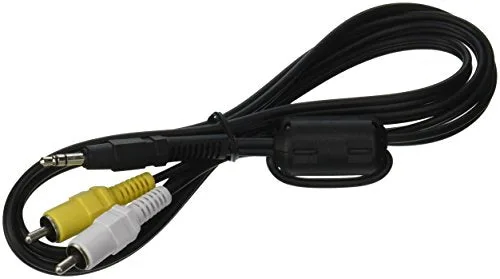
Nikon EG-D2 Audio Video Cable for Nikon DSLR Cameras
-
Nikon EG-D2 Audio Video Cable for Nikon DSLR Cameras: Compatible with the Nikon D80, D200, D2H, D2X, D2XS, and D200. Compatibility is limited to these listed models, so matching your camera is the first checkpoint.
-
Nikon EG-D2 Audio Video Cable for Nikon DSLR Cameras: Features an interference shield that improves signal and quality mono sound. The shield is a manufacturer-described feature; it does not guarantee a specific picture or sound result on your TV.
Connecting the camera to your TV
These steps cover the physical connection and TV input selection. The supplied product information does not include camera menu instructions, so use your camera's playback menu to start output if needed.
- Power off both devices: Turn off the camera and the TV before making connections to avoid handling issues.
- Connect the EG-D2 to the camera: Plug the camera-specific end of the EG-D2 into the compatible Nikon DSLR's video-out port. The cable is designed for the listed models only.
- Connect the RCA plugs to the TV: Attach the audio/video RCA plugs to the matching input jacks on your TV. Match plug colors to jack colors where your TV labels them.
- Select the TV input: Turn on the TV and choose the input that corresponds to the RCA jacks you used. Then power on the camera and enter playback mode.
- Start playback on the camera: Use the camera's playback controls to display photos or videos. The supplied information does not detail menu settings, so consult your camera manual if the TV does not show an image.
What the cable does and does not promise
The EG-D2 carries standard-definition composite video and mono audio to a TV. The catalog describes quality mono sound and an interference shield, but those are manufacturer descriptions rather than tested performance claims. Do not expect the cable to improve resolution beyond what your camera outputs or to add stereo sound; the supplied record specifies mono audio.
If your TV lacks RCA inputs, the supplied information does not confirm an adapter or alternative connection method. Check your TV's available inputs before planning a setup.
Practical checkpoints before you buy
- Camera model match: Confirm your DSLR is one of the listed models: D80, D200, D2H, D2X, or D2XS.
- TV input availability: Make sure your TV has composite RCA audio/video inputs available.
- Cable length and placement: The supplied record does not state cable length, so plan your camera-to-TV distance accordingly and avoid pulling the cable taut.
- One cable per camera: Because the EG-D2 is model-specific, keep it with the compatible body rather than treating it as a shared accessory.
When the EG-D2 is the right choice
The Nikon EG-D2 is a straightforward way to play back stills and videos from a supported Nikon DSLR on a TV with RCA inputs. It suits owners of the D80, D200, D2H, D2X, or D2XS who want a simple wired connection. If your camera is not on that list, or your TV only has HDMI or other digital inputs, the supplied information does not confirm this cable as a solution.