Quick Answer
Setting up a Nintendo 64 console is straightforward: connect the AV cables to your TV, plug in the power adapter, insert a game cartridge, and press the power button. This guide walks through each step with common pitfalls to avoid.
What You Need Before You Start
Your refurbished Nintendo 64 console should arrive with the console unit, one controller, an AV cable, and a power adapter. You will also need a game cartridge and a TV or display with composite or S-Video input. Modern flat-panel TVs often lack these older ports, so you may need an AV-to-HDMI converter if your display only has HDMI inputs.
Common Setup Mistakes to Avoid
The most frequent error is plugging the AV cable into the wrong input on the TV, or using a damaged cable that produces no picture. Another is inserting the game cartridge incorrectly—the N64 cartridge only fits one way, and forcing it can damage the pins. Always ensure the console is off before inserting or removing cartridges.
Step-by-Step N64 Setup
- Step 1: Connect the AV Cable: Plug the yellow (video), white (left audio), and red (right audio) RCA connectors into the corresponding inputs on your TV or converter. Match the colors exactly. Common mistake: plugging the yellow cable into a green component input will give you no picture.
- Step 2: Attach the Power Adapter: Connect the power adapter to the back of the N64 console, then plug it into a wall outlet. Do not use a power strip that is overloaded. Checkpoint: the console's red LED should light up when the power is on—if not, verify the adapter is fully inserted.
- Step 3: Insert a Game Cartridge: With the console off, hold the cartridge label side up and slide it straight into the slot until it clicks. Press down firmly but gently. Common mistake: inserting the cartridge backward or at an angle can bend the pins—always align the notch on the cartridge with the slot.
- Step 4: Power On and Select Input: Press the power button on the console. Use your TV remote to select the correct AV input (often labeled AV, Video, or Input 1). Checkpoint: if you see a blank screen, cycle through all inputs—some TVs label composite inputs as 'AV' or 'Video'.
- Step 5: Adjust TV Settings (If Needed): If the image is black and white or distorted, check that your TV is set to the correct video standard (NTSC for North American consoles). Some modern TVs require you to set the input to '4:3' aspect ratio for proper display. Common mistake: a black-and-white picture usually means the TV is expecting an S-Video signal but receiving composite—try a different input or cable.
Product Details
-
Nintendo 64 (N64) Classic Gaming Console: Each console is expertly refurbished, thoroughly cleaned, and fully tested to ensure reliable operation. This means your N64 should work out of the box without needing internal repairs, but you still need to connect it correctly to enjoy it.
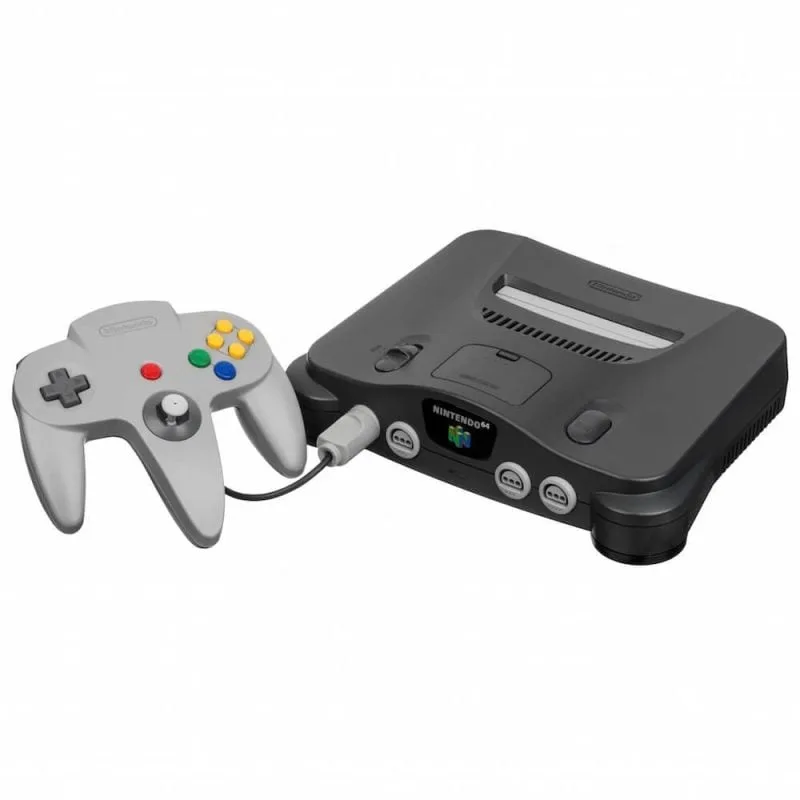
Nintendo 64 (N64) Classic Gaming Console