Quick Answer
Unbox the Nitro Deck Retro Pink Edition bundle, inspect the Gear Bag and Stick Top 8 Pack, then assemble the deck and attach the stick tops for a comfortable, drift-free gaming session.
What's in the Box
The bundle includes the Nitro Deck Retro Pink Edition handheld deck, a matching Gear Bag, and a Stick Top 8 Pack (Retro Edition). The deck is built for the Nintendo Switch and OLED Model, focusing on comfort and zero stick drift. The Gear Bag protects your deck during travel, while the stick tops add a retro aesthetic and grip improvement.
Step-by-Step Setup Guide
- Unbox and Inspect: Open the bundle box and remove the Nitro Deck, Gear Bag, and Stick Top 8 Pack. Check each item for damage. The Gear Bag should have a padded interior; the deck should slide in smoothly. If the deck doesn't fit the bag snugly, double-check you have the correct Gear Bag model—it's designed for the Nitro Deck.
- Insert Your Switch: Slide your Nintendo Switch (or OLED Model) into the Nitro Deck. The deck uses a USB-C connector at the bottom—align it carefully. Push until you hear a click. The deck's ergonomic grips should feel natural in your hands. Do not force the console. If it doesn't click, remove and re-align. Forcing can damage the USB-C port.
- Attach Stick Tops: Choose your favorite stick tops from the 8-pack. Each top slides over the existing joystick. Press down firmly until it snaps into place. The retro design adds grip and a vintage look. Make sure the stick top is fully seated; a loose top can pop off during intense gameplay.
- Store in Gear Bag: Place the assembled deck into the Gear Bag. The bag has a dedicated compartment for the deck and extra pockets for the stick tops or small accessories. Zip it up and you're ready to go. Avoid overstuffing the bag—it's designed for the deck and a few small items. Too much pressure can warp the bag's shape.
- Test Before Playing: Power on your Switch while docked in the Nitro Deck. Check that all buttons respond and the stick tops don't interfere with movement. The deck should feel balanced and comfortable. If you notice any stick drift, the deck's zero-drift design should eliminate it—but confirm the stick tops are correctly attached first.
Product Facts
-
Nitro Deck Retro Pink Edition + Gear Bag + Stick Top 8 Pack Bundle: The Nitro Deck Retro Pink Edition is built for comfort and speed with zero stick drift, and includes the Gear Bag and Stick Top 8 Pack. You get a complete portable gaming setup out of the box—no need to buy accessories separately.
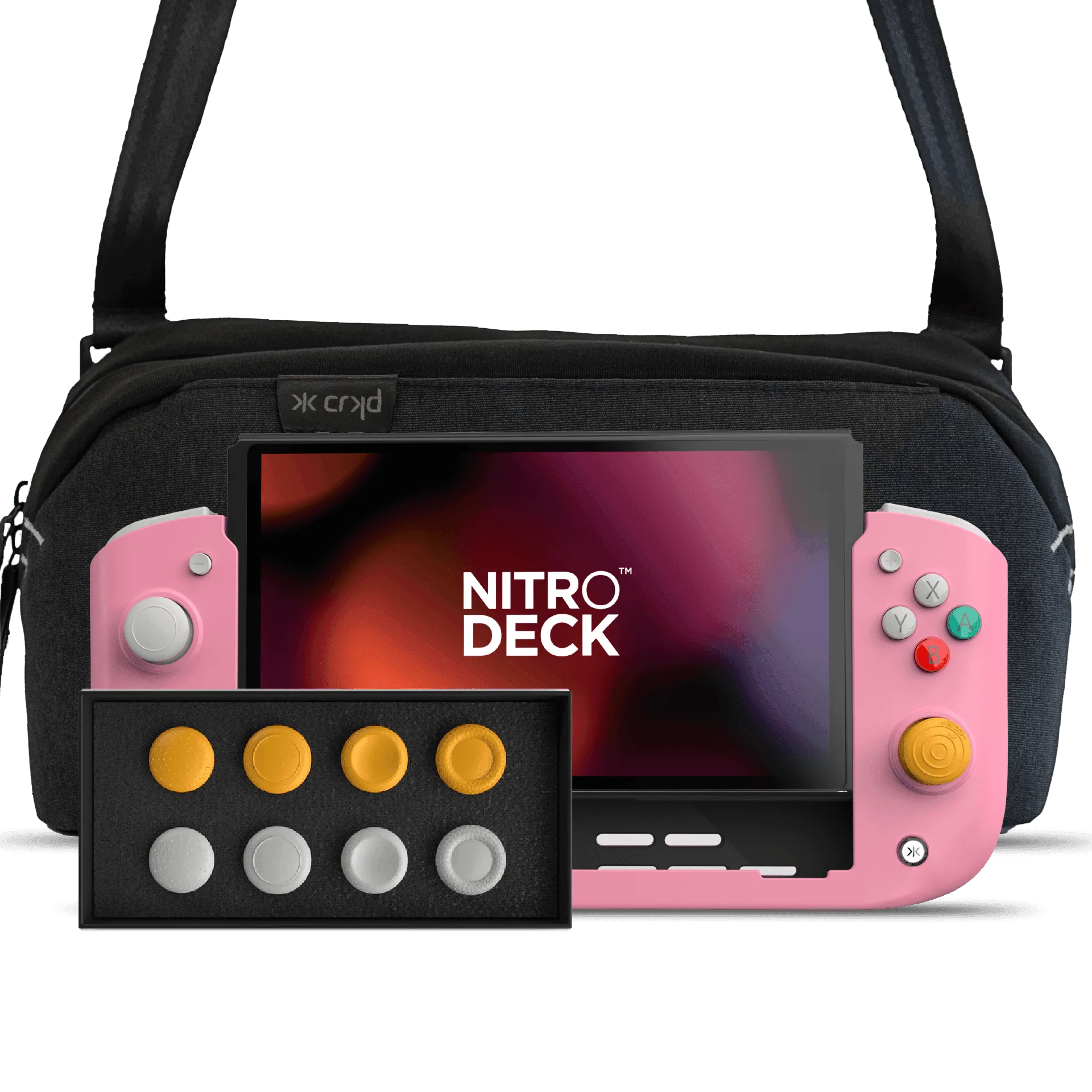
Nitro Deck Retro Pink Edition + Gear Bag + Stick Top 8 Pack Bundle