Start with the body and lenses you actually have
The Olympus OM-D E-M10 Mark IV two-lens kit pairs a compact Micro Four Thirds body with two zooms that cover very different ground: the 14-42mm EZ for everyday scenes and the 40-150mm for reach. Before you change menu settings, confirm what is in the box and how the pieces fit together. The body weighs 11.82 oz / 335 g and measures 4.79 x 3.32 x 1.93" / 121.7 x 84.4 x 49 mm, so it is easy to handle while you work through the first setup.
The 14-42mm EZ is a super-slim zoom with a 37mm front filter thread and a minimum focusing distance of 7.87" / 20 cm. The 40-150mm lens has a 58mm filter thread and a minimum focusing distance of 2.95' / 90 cm. Those close-focus limits matter when you decide which lens to mount for a given shot, and they are worth noting before you start shooting.
A sensible first-run sequence for the E-M10 Mark IV
Work through these steps in order so you are not hunting for basic controls later. The camera supports stills and video, and the supplied information confirms Wi-Fi and Bluetooth are on board for wireless sharing and control through the Olympus app.
- Charge the BLS-50 battery: The kit uses a BLS-50 rechargeable lithium-ion battery rated 7.2 VDC, 1175 mAh. Charge it before your first session so you are not setting up with a depleted pack.
- Mount the 14-42mm EZ first: Start with the compact zoom to learn the body controls and menu layout. Its 28-84mm equivalent range covers everyday scenes, wide views, and gentle portraits without changing lenses.
- Set image quality and exposure mode: The E-M10 Mark IV offers Program, Aperture Priority, Shutter Priority, Manual, and Auto exposure modes. For a first run, Program or Aperture Priority keeps the process simple while you learn the dials.
- Check the flip-down LCD and diopter: The flip-down screen helps with self-portraits and low angles. Adjust the viewfinder diopter to your eye before you rely on it for framing.
- Pair the Olympus app: The camera has Wi-Fi and Bluetooth. Use the Olympus app to transfer images or control the camera wirelessly, but treat pairing as a separate step after you are comfortable with basic shooting.
Body details that shape your setup choices
-
Olympus OM-D E-M10 Mark IV Body with (14-42mm EZ) (40-150mm) Black: 20.3MP Live MOS sensor and TruePic VIII processor These are the core imaging components. Knowing the resolution helps you plan storage and cropping, while the processor name is useful when you look up compatible settings and features.
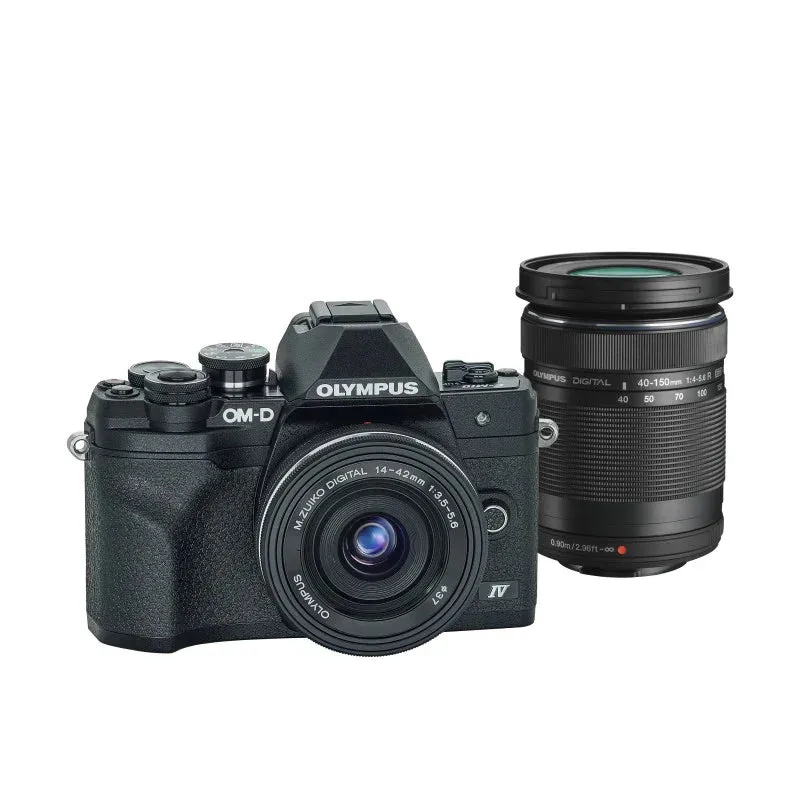
Olympus OM-D E-M10 Mark IV Body with (14-42mm EZ) (40-150mm) Black
-
Olympus OM-D E-M10 Mark IV Body with (14-42mm EZ) (40-150mm) Black: Sensor-shift 5-axis image stabilization Stabilization helps hold frames steady in low light or handheld shooting. It is a built-in feature, so you do not need a stabilized lens to benefit.
-
Olympus OM-D E-M10 Mark IV Body with (14-42mm EZ) (40-150mm) Black: ISO 200 to 25,600 in auto mode, extended 100 to 25,600 This range tells you what to expect when setting exposure. For a beginner setup, leaving ISO in auto while you learn aperture and shutter speed is a practical starting point.
Settings worth changing before your first shoot
The E-M10 Mark IV has a deep menu, but you do not need to adjust everything at once. These are the settings that most directly affect your first results, based on the supplied specifications.
- Set a practical ISO starting point: The camera covers ISO 200 to 25,600 in auto mode, with an extended low setting of 100. If you want more control than full auto, set a ceiling you are comfortable with and let the camera choose within that range.
- Choose a burst mode that matches your subject: The E-M10 Mark IV can shoot up to 8.7 fps with unlimited frames in Raw or JPEG, up to 15 fps for a limited burst of 42 Raw or 49 JPEG frames, and up to 6.3 fps for up to 945 Raw frames or unlimited JPEG. For everyday scenes, the slower unlimited mode is often enough; for action, the 15 fps burst gives you a short, fast sequence.
- Pick a flash mode only when you need it: The supplied flash modes include Fill Flash, Off, Red-Eye Reduction, Second-Curtain Sync, Slow Sync, and Slow Sync/Red-Eye Reduction. For available-light shooting, leave flash off; for fill, choose the mode that matches the scene rather than leaving it on by default.
- Set white balance to Auto or a preset: White balance options include Auto and Color Temperature. Auto is a reasonable starting point; switch to a preset when you want consistent color under mixed lighting.
How to use the 14-42mm EZ for everyday scenes
The 14-42mm EZ is the lens to keep mounted when you are not sure what you will shoot. Its 28-84mm equivalent range covers wide scenes and gentle portraits, and the 7.87" / 20 cm minimum focusing distance lets you get reasonably close to small subjects. The lens is compact at 2.4 x 0.9" / 61 x 22.9 mm and weighs 3.2 oz / 91 g, so it balances well on the lightweight body.
For a beginner setup, treat the 14-42mm as your learning lens. Practice zooming to frame rather than moving your feet, and use the flip-down screen for low-angle or self-portrait shots. The 37mm filter thread is a common size, so if you add a filter later, check that it matches this lens rather than the telephoto.
How to use the 40-150mm for reach
The 40-150mm lens gives you an 80-300mm equivalent range, which is useful for distant wildlife, sports moments, or travel sights. Its minimum focusing distance is 2.95' / 90 cm, so it is not a close-up lens; plan to step back or zoom out if your subject is near. The lens measures 2.5 x 3.27" / 63.5 x 83 mm and weighs 6.7 oz / 190 g, and it extends to 5.6" / 142.2 mm at maximum extension.
When you switch to the 40-150mm, give yourself room to frame. The longer focal length magnifies both your subject and any camera shake, so the body's 5-axis stabilization is worth relying on. The 58mm front filter thread is larger than the kit zoom's, so filters are not interchangeable between the two lenses without a step-up ring.
Lens specifications that affect handling
- Olympus OM-D E-M10 Mark IV Body with (14-42mm EZ) (40-150mm) Black: 14-42mm EZ: 28-84mm equivalent, 37mm filter thread, 7.87" / 20 cm minimum focus These numbers tell you how wide you can go, what filter size to buy, and how close you can get before the lens will not focus.
- Olympus OM-D E-M10 Mark IV Body with (14-42mm EZ) (40-150mm) Black: 40-150mm: 80-300mm equivalent, 58mm filter thread, 2.95' / 90 cm minimum focus The reach is the reason to carry this lens, but the longer close-focus distance means you cannot treat it as a macro substitute.
Operating limits to keep in mind
The supplied specifications include environmental and power details that are easy to overlook during setup. Treat these as planning information, not as instructions to exceed.
- Temperature range: The camera is specified for operation from 14 to 104°F / -10 to 40°C, with storage from -4 to 140°F / -20 to 60°C. If you shoot in cold or hot conditions, let the camera adjust before use and avoid leaving it in extreme temperatures.
- Humidity: Operating humidity is listed at 30 to 90%, and storage humidity at 10 to 90%. Keep the kit dry and avoid sudden condensation when moving between environments.
- Battery type: The BLS-50 battery is specific to this camera. The supplied information does not confirm battery life figures, so plan to carry a spare if you shoot long sessions.
A two-lens workflow that avoids missed shots
The practical rhythm with this kit is to start wide and switch to tele only when you need reach. Mount the 14-42mm for walk-around shooting, and keep the 40-150mm accessible for when a subject is too far for the standard zoom. Because the lenses have different filter sizes and close-focus limits, decide which one you will use before you leave rather than swapping mid-scene.
The E-M10 Mark IV supports interval recording and a 2/12-second self-timer, which are useful for tripod work or group shots. The supplied information does not detail every menu path, so use the camera's own menus to locate these features rather than relying on a generic sequence. If a setting is not confirmed in the supplied specifications, treat it as something to verify on the camera before you depend on it.