Quick answer
For underwater and wildlife video, the Panasonic GH7 offers robust video features that benefit from specific settings adjustments to maximize performance in aquatic and natural environments.
Why the GH7 Works for Aquatic and Wildlife Video
The Panasonic GH7 is designed with video production speed and quality in mind, making it a strong candidate for underwater and wildlife filming. Its compact body and advanced video capabilities allow for flexible mounting in underwater housings and on gimbals in the field. However, the specific settings you choose can significantly impact your results, especially in challenging lighting and movement conditions.
For underwater use, white balance and color profile adjustments are critical to compensate for light absorption and color shift. For wildlife, autofocus and stabilization settings need to balance speed and accuracy to capture fast-moving subjects without introducing shake.
Trade-offs to Consider
The GH7's video features are extensive, but no single setting works for every scenario. Underwater filming often requires manual white balance and a flat color profile to preserve detail in post-production, whereas wildlife shooting may benefit from a more contrasty profile to reduce editing time. Stabilization settings also differ: underwater you may want to minimize electronic stabilization to avoid artifacts in moving water, while wildlife shooters often rely on it for handheld telephoto shots.
Battery life is another factor. Underwater housings can limit access to battery swaps, so plan for longer recording sessions. Wildlife shooters may need to conserve power during long waits. The GH7's power management settings should be adjusted accordingly.
Decision rules for GH7 video setup
- Underwater white balance: Set white balance manually to a kelvin value between 5000K and 5600K for typical underwater lighting. Use a gray card or white balance filter in your housing to achieve accurate color.
- Color profile for aquatic footage: Select a flat or log-like picture profile (e.g., V-Log L if available) to retain highlight and shadow detail. This gives you flexibility to correct color cast in post.
- Stabilization for underwater: Disable or set electronic stabilization to low when filming underwater. Water movement can confuse the stabilization system and introduce unwanted wobble. Consider using a stabilized housing tray instead.
- Autofocus for wildlife: Use continuous autofocus with subject tracking enabled. Set the AF sensitivity to a higher value to keep fast-moving animals in focus. Test with your lens beforehand.
- Stabilization for wildlife: Activate the GH7's in-body image stabilization (IBIS) and pair with a lens that has optical stabilization. For telephoto shots, use a monopod or tripod when possible. IBIS may not fully compensate for long lens shake at extreme focal lengths.
- Power management: Set the camera to power-saving mode and disable features like Wi-Fi and Bluetooth when not needed. Carry spare batteries and plan for quick swaps.
Product facts
-
Panasonic LUMIX GH7 Mirrorless Camera Body: Panasonic describes the GH7 as delivering dramatic enhancements in the speed and quality of video production. This means the camera is particularly well-suited for video workflows where efficiency and output quality are priorities, such as underwater and wildlife documentary projects.
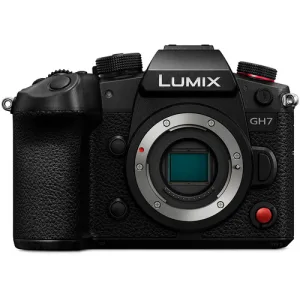
Panasonic LUMIX GH7 Mirrorless Camera Body
Who this setup is for
Best for
- Underwater videographers who need a compact camera with advanced video features and manual control over color and stabilization.
- Wildlife shooters who require reliable autofocus and stabilization for handheld telephoto video in natural light conditions.
Not for
- Studio videographers who need a full-frame sensor for shallow depth of field and maximum low-light performance.
- Budget-conscious buyers who can meet their needs with a lower-priced camera and fewer video features.