Quick Answer
To create a custom Quad Lock 360 setup for your car, use the 360 Kit Builder to select a mount base, arm, and head that fit your vehicle and phone. Start by determining where you want to mount your device, then choose compatible components like a suction mount or adhesive pad. For wireless charging, add the Quad Lock 360 Head - Wireless Charging Head to your setup.
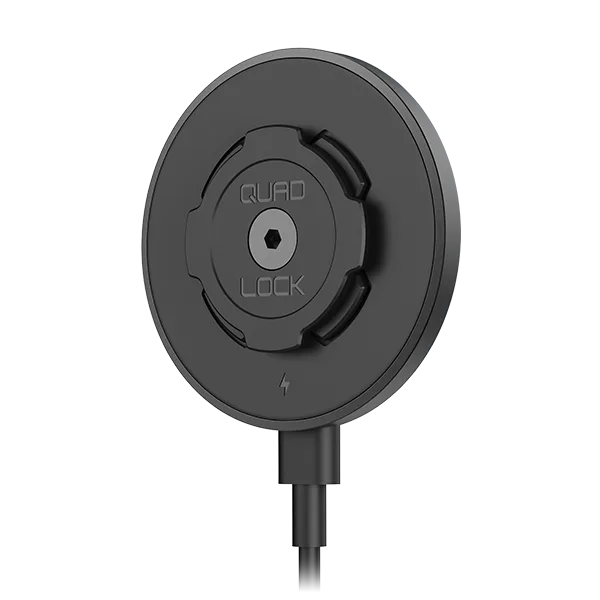
Quad Lock 360 Head - Wireless Charging Head
The Quad Lock 360 Kit Builder is your gateway to a truly custom mounting solution for your car. Whether you drive a daily commuter, a rugged off-roader, or a family SUV, the modular 360 system lets you mix and match bases, arms, and heads to create a mount that fits your exact needs. This guide walks you through the process, from choosing the right components to installing them securely.
With the Kit Builder, you can combine a variety of mounts, including suction windscreen mounts, adhesive dash pads, and roll cage mounts, with different heads like the standard twist-lock or the wireless charging head. By the end, you'll have a setup that holds your phone securely, charges it on the go, and looks clean in your vehicle.
Step 1: Identify Your Mounting Location
Before you start adding components to your Quad Lock 360 Kit Builder cart, decide where you want your phone to sit. Common spots include the windscreen, the dashboard, an air vent, or a roll cage if you drive an off-road vehicle. Each location has its own mounting solution, so your choice here will determine the base of your setup.
For windscreen or dashboard mounting, the Suction Windscreen/Dash Mount is a popular choice. If you prefer a more permanent attachment, the Adhesive Dash Pad (a replacement part) uses 3M adhesive to secure the mount to your dash. Consider visibility and reach: you want your phone within easy sight without obstructing your view of the road.
- Check local laws regarding phone mounting positions to avoid fines.
- Ensure the surface is clean and dry before attaching any adhesive.
Step 2: Choose the Right Base and Arm
The base is the part that attaches to your vehicle, and the arm provides reach and adjustability. For most car setups, a suction mount with a single or dual pivot arm works well. If you drive an off-road vehicle with roll bars, consider the Quad Lock 360 - Roll Cage Mount, which includes a base, arm, and head designed for that purpose.
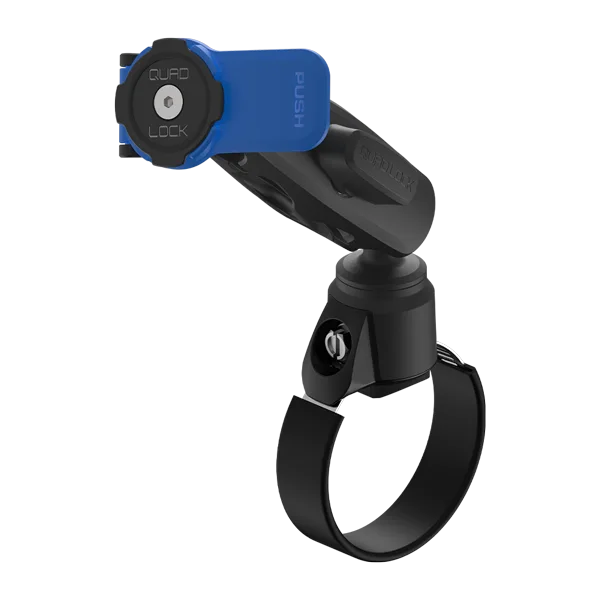
Quad Lock 360 - Roll Cage Mount
The Roll Cage Mount features a patented dual-stage Lever Head that holds your device secure on rough terrain, and its dual pivot arm offers two points of adjustment for finding the perfect angle. When selecting an arm, think about how much reach you need and whether you want to adjust the angle frequently.
- Measure the distance from your mounting point to where you want the phone to sit.
- Choose a longer arm if you need extra reach, but avoid excess length that could cause vibration.
Step 3: Select the Head for Your Phone
The head is the part that holds your phone. Quad Lock offers several head options, including the standard twist-lock head and the Wireless Charging Head. If you want to charge your phone wirelessly while driving, the Quad Lock 360 Head - Wireless Charging Head is a great choice. It combines secure twist-lock mounting with convenient wireless charging, so you can keep your battery topped up on the go.
The Wireless Charging Head comes with everything you need for easy installation and works with your existing Quad Lock case or adapter. It's designed to hold your device securely even on bumpy roads, and its one-hand twist-and-lock mechanism makes mounting simple. If you don't need charging, a standard head may be more budget-friendly.
- Ensure your phone case is Quad Lock compatible (either a Quad Lock case or Universal Adapter).
- Check that your phone supports wireless charging if you opt for the Wireless Charging Head.
Step 4: Assemble and Install Your Setup
Once you've selected all your components, assemble them according to the instructions. Typically, you'll attach the base to your vehicle, then connect the arm, and finally attach the head. The Quad Lock system is designed for easy twist-and-lock assembly, so you shouldn't need any tools.
For a windscreen mount, press the suction cup firmly against the glass and lock it into place. For an adhesive dash pad, clean the surface, peel off the backing, and press firmly. After assembly, test the mount by placing your phone and adjusting the angle to your preferred viewing position.
- Tighten all pivot points securely to prevent movement while driving.
- If using a wireless charging head, plug in the power cable and route it neatly.
Step 5: Test and Adjust
Before hitting the road, give your new mount a final test. Place your phone in the mount and ensure it locks securely. Adjust the arm and head to your desired angle, and make sure the mount doesn't obstruct any controls or vents. If you notice any wobble, tighten the adjustments.
Take a short test drive to ensure the mount holds steady on bumps and turns. If you experience vibration, consider a shorter arm or a different mounting location. Remember, the goal is a secure, functional, and convenient setup that enhances your driving experience.
- Check the mount periodically for loose screws or suction cup loss.
- Clean the suction cup and mounting surface regularly to maintain grip.
Step-by-Step Assembly Checklist
- Choose your mounting location: Decide whether you'll mount on the windscreen, dashboard, or roll cage. This determines your base and arm selection. Checkpoint: Ensure the location provides clear visibility and doesn't interfere with airbags or controls.
- Select compatible components: Use the Kit Builder to pick a base, arm, and head that are compatible. For wireless charging, include the Wireless Charging Head. Checkpoint: Verify that all parts are designed for your vehicle type and phone model.
- Assemble the mount: Attach the base to your vehicle, connect the arm, and then the head. Twist-lock each part securely. Checkpoint: Make sure all connections are tight and there's no play in the mount.
- Install and adjust: Place your phone in the mount and adjust the arm and head to your preferred angle. Test the mount's stability. Checkpoint: Take a short drive to confirm the mount holds steady without vibration.
Key Components for Your Custom Setup
- Quad Lock 360 Head - Wireless Charging Head: Combine the Quad Lock® Wireless Charging Head with your Quad Lock 360TM setup for easy twist, lock mounting and convenient wireless charging. The twist, lock head holds your device secure while driving bumpy roads or navigating turbulent skies. This head adds wireless charging capability to your custom car mount, so you can keep your phone powered without fumbling with cables.
- Quad Lock 360 - Roll Cage Mount: The Quad Lock 360TM Roll Cage Mount includes the Quad Lock 360TM Base, Arm and Head perfect for mounting your device on your side-by-side, UTV, ATV, off-road vehicle, race vehicle, or other roll bars. Its patented dual-stage Lever Head holds your device secure, even on the roughest terrain. If you drive an off-road vehicle, this mount provides a complete solution with a secure head and adjustable arm, ensuring your phone stays put on rough trails.
Building a custom Quad Lock 360 setup for your car is straightforward with the Kit Builder. By selecting the right base, arm, and head, you can create a mount that fits your vehicle and lifestyle. Start with the Quad Lock 360 Head - Wireless Charging Head to add charging convenience to your setup, and explore the full range of components to perfect your custom mount.