Quick answer
To add the Hotshots River promo tile to your game, place it as a non-scorch, non-entry tile that provides Support to up to three adjacent tiles, following the setup steps below.
What the River tile does and what it doesn't do
The River promo tile is a special tile in Hotshots. You can't enter it, but it can never be scorched. Instead, it adds Support to up to three adjacent tiles, which helps you manage the blaze more effectively.
Because the tile is never scorched, it stays in play for the whole game. That makes it a reliable anchor for your strategy, but it also means you need to plan around its fixed position and the fact that it doesn't provide a space for your firefighter to stand on.
How to Add the River Tile to Hotshots
- Check your game version: Confirm that your Hotshots set has a spot for promo tiles. If you're unsure, compare the board layout with the included rule summary sheet to find the intended placement area. If no dedicated slot exists, place the tile adjacent to the fire zone so it still touches three other tiles.
- Place the River tile: Set the River tile in a spot that touches three adjacent tiles. You can't enter the River tile, so treat it as a permanent obstacle for movement. Check that the River tile doesn't block the only path to a critical tile.
- Apply the Support bonus: The River tile adds Support to 3 adjacent tiles. Count the tiles that share an edge with the River and mark them as supported before the next fire spread. Remember the River tile itself can never be scorched, so it's a safe anchor in the firefight.
Product facts
-
Hotshots River Promo Tile: The River promo tile can be added to your game to help cool things down. You can't enter the River tile, but it can never be scorched and adds Support to 3 adjacent tiles. This means you can place the River tile as a permanent safe zone that boosts nearby tiles, but you must plan around the fact that no firefighter can stand on it.
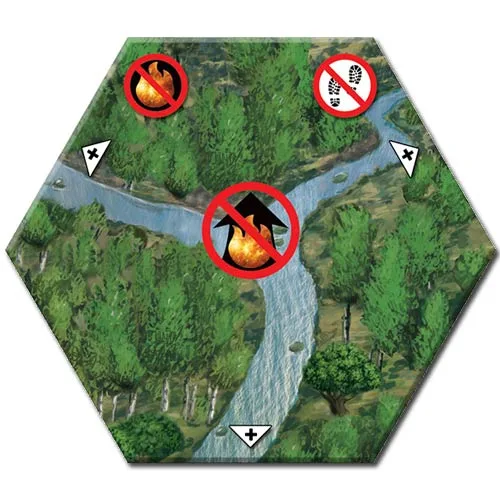
Hotshots River Promo Tile