Quick Answer
To secure your phone on a scooter using a Quad Lock scooter mirror mount, first ensure your mirror stem is compatible, then attach the mount base, install the Quad Lock head, and finally lock your phone into place. Always double-check the tightness and alignment before riding.
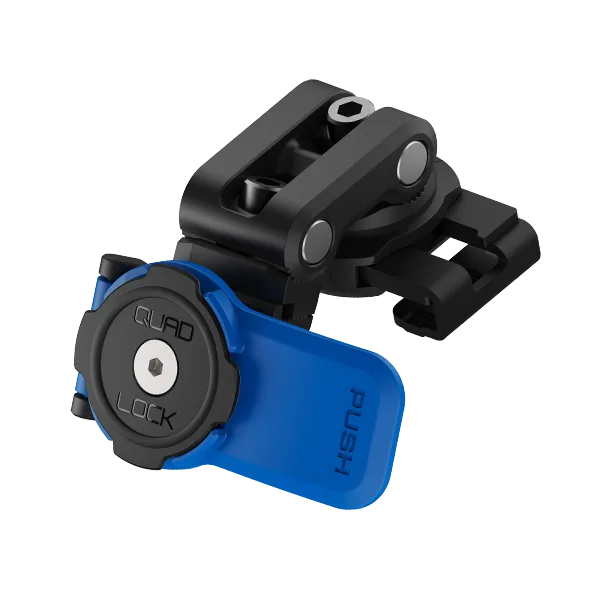
Riding a scooter or maxi scooter often means needing your phone for navigation or music, but holding it is unsafe and illegal in many places. A mirror mount offers a convenient viewing angle without cluttering your handlebars. Quad Lock's mirror mounts are designed to attach to the brake reservoir or mirror stem, but this guide focuses on the scooter mirror mount specifically.
Whether you're commuting daily or taking a long tour, a secure phone mount is essential. The Quad Lock system uses a patented dual-stage locking mechanism, ensuring your phone stays put even on bumpy roads. In this guide, we'll walk you through the installation process step by step, highlight common mistakes, and offer practical tips for a rock-solid fit.
Check Compatibility Before You Start
Not all scooter mirrors are the same. Some have a standard 10mm thread, while others might be 8mm or have an unusual shape. Quad Lock mirror mounts typically come with adapters to fit various sizes, but you must verify that your mirror stem is compatible before purchasing. Check the diameter and thread pitch of your mirror base.
If your scooter has a brake reservoir instead of a mirror stem, consider the Quad Lock Brake Reservoir Mount, which is designed for square brake fluid reservoirs commonly found on maxi scooters and motorcycles. Knowing your mounting point ensures you buy the right accessory and avoid frustration during installation.
- Measure your mirror stem diameter with a caliper or ruler.
- Check the thread pitch (usually 10mm or 8mm) against the mount's specifications.
- If in doubt, contact Quad Lock support or consult your scooter's manual.
Gather the Necessary Tools and Parts
Before you begin, collect all required items. You'll need the Quad Lock mirror mount base, the appropriate adapter (if included), a Hex key or wrench (often provided), and your Quad Lock phone case or universal adaptor. Having everything ready prevents mid-installation delays.
If you're using a universal adaptor, ensure it's adhered to your phone or case and has cured for the recommended time (usually 24 hours) before mounting. This is a common oversight that leads to the phone detaching while riding.
- Use the correct size Hex key to avoid stripping screws.
- If your universal adaptor is new, let the adhesive set for at least 24 hours.
- Keep a clean cloth handy to wipe any grease from the mirror stem.
Position the Mount for Optimal Viewing
The ideal position for your phone is within your peripheral vision without obstructing your view of the road. Typically, mounting on the left or right mirror stem works well, but you might prefer the center if your scooter has a central mirror mount. Sit on your scooter and simulate your riding posture to determine the best angle.
Remember that the mount should not interfere with your mirror's adjustment. Ensure you can still tilt the mirror as needed. Also, consider the weight of your phone; a heavy phone might cause the mirror to vibrate, so a shorter extension or a more secure mounting point might be necessary.
- Test the viewing angle by sitting on the scooter and looking at the mount.
- Adjust the mirror's range of motion to ensure the mount doesn't block it.
- If using a brake reservoir mount, make sure it doesn't interfere with brake fluid access.
Secure the Mount Base
Once you've chosen the position, attach the mount base to the mirror stem. Slide the base over the stem or use the adapter provided. Tighten the screws evenly using a Hex key, but avoid over-tightening, which can strip threads or crack the mirror housing. The mount should be snug but not so tight that it distorts the mirror assembly.
After tightening, give the mount a firm tug to test its stability. If it moves, readjust. A loose base will cause your phone to wobble and potentially fall. Remember that vibrations from the scooter can loosen screws over time, so periodic checks are wise.
- Use thread-locker (like Loctite) on the screws if you plan to leave the mount attached long-term.
- Check the tightness after the first ride, as vibrations can settle the mount.
- If the mount base has a ball joint, adjust it to your preferred angle before locking it down.
Attach the Quad Lock Head and Phone
With the base secure, attach the Quad Lock head (the part that holds your phone) to the mount. Depending on your setup, this might be a twist-lock head or a MAG head. Twist-lock requires you to align the phone's adaptor with the head and twist 90 degrees clockwise until it clicks. MAG heads use magnets for a quick attach, but they still have a mechanical lock for security.
Place your phone onto the head, ensuring the adaptor on your case lines up. For twist-lock, press firmly and twist until you hear a click. For MAG, the phone will snap into place, but you should also engage the mechanical lock if available. Give the phone a gentle pull to confirm it's locked.
- Always double-check that the locking mechanism is fully engaged before riding.
- If using a MAG head, ensure the metal ring on your case is compatible.
- Avoid using thick cases that might interfere with the locking mechanism.
Step-by-Step Installation Checklist
- Verify Compatibility: Measure your mirror stem or brake reservoir to ensure the Quad Lock mount fits. Choose the correct mount type. Checkpoint: If the mount doesn't fit, don't force it—consider an alternative mounting point.
- Prepare Your Phone: Attach a Quad Lock case or universal adaptor to your phone. If using a universal adaptor, allow adhesive to cure for 24 hours. Checkpoint: Ensure the adaptor is firmly attached and centered.
- Position the Mount: Sit on your scooter and decide the best viewing angle. Ensure the mount doesn't obstruct your mirror or controls. Checkpoint: Adjust the mirror to confirm it still moves freely.
- Secure the Base: Attach the mount base to the mirror stem or brake reservoir. Tighten screws evenly but not too tightly. Checkpoint: Tug the base to ensure it's stable.
- Attach the Head and Phone: Lock the Quad Lock head onto the base, then attach your phone. Twist to lock or use MAG, ensuring a click or secure snap. Checkpoint: Give your phone a gentle pull to confirm it's locked.
- Test Ride and Recheck: Take a short test ride on a smooth road. After a few minutes, check the tightness of the mount and the phone's security. Checkpoint: If any wobble is felt, stop and tighten the base further.
Quad Lock Products That Enhance Your Setup
- Scooter/Motorcycle - Brake Reservoir Mount: The Quad Lock® Brake Reservoir Mount is the perfect solution for mounting your phone to maxi scooters, scooters, and motorcycles' square brake fluid reservoirs. With our patented dual-stage locking mechanism, you can be confident your smartphone will stay securely attached as you ride, no matter the conditions. If your scooter lacks a mirror stem or you prefer a more central location, this mount offers a stable alternative that uses the brake reservoir as a solid anchor.
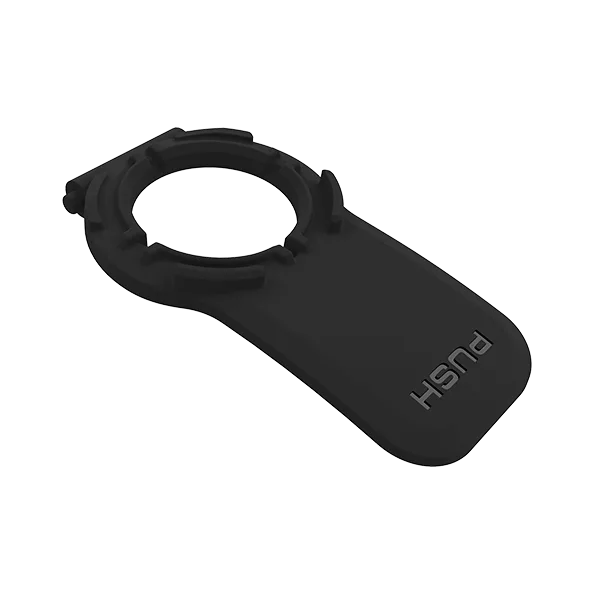
- Lever Mounts - Colored Levers: Customize the look of your Quad Lock® Mount with different colored levers to choose from in Black, Red, White, or Blue. Easily change your existing mount by attaching one of the custom colored lever options available. PLEASE NOTE: This is only the Mount Lever. The Mount base is not included. Lever is compatible with lever head mounts, excluding the Running Sports Armband. Personalize your mirror mount to match your scooter's style while ensuring the lever is compatible with your specific Quad Lock head.
A Quad Lock scooter mirror mount provides a secure and convenient way to keep your phone accessible while riding. By following these steps and checking compatibility, you'll enjoy a stable mount that lasts. Remember to periodically inspect the mount for tightness, especially after long rides or rough roads.