Quick Answer
To use the Quest Phaser Launch Controller, insert the safety key, connect the micro clips to the igniter, arm the system with the red LED indicator, and press the large launch button. Always verify the safety key is removed after launch.
Why the Phaser Controller Stands Out
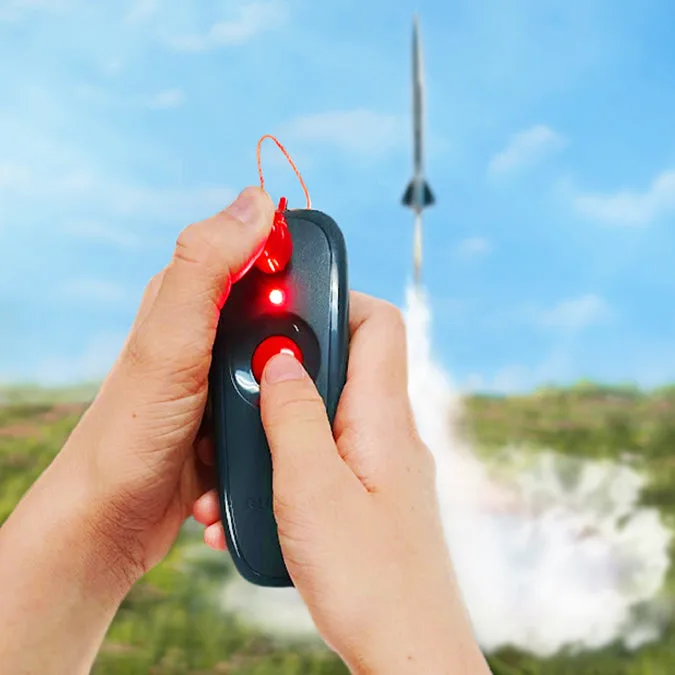
The Quest Phaser Launch Controller (model 7512) features a futuristic handheld design for two-handed operation, making it easier to stabilize during launch. The bright red LED arming light signals a ready-to-launch status, and the large red launch button simplifies ignition. A spring-loaded safety key adds an extra layer of security, reducing accidental launches.
How to Set Up and Use the Quest Phaser Launch Controller
- 1. Inspect and Prepare: Check the controller for any damage, especially the micro clips and wires. Insert four AA batteries (not included) into the battery compartment. Common mistake: using old or mismatched batteries can cause weak igniter firing.
- 2. Connect the Igniter: Attach the micro clips to the igniter leads—one clip per lead. Ensure the clips do not touch each other or any metal surface. Common mistake: letting the clips touch can cause a short circuit and prevent ignition.
- 3. Insert the Safety Key: Push the spring-loaded safety key fully into the controller until it clicks. The red LED will not light until the key is inserted. Common mistake: partially inserting the key can cause intermittent connection.
- 4. Arm and Launch: Press and hold the arming button until the red LED stays lit. Then press the large launch button to ignite the motor. Common mistake: releasing the arming button before pressing launch will disarm the system.
- 5. Disarm and Store: Immediately remove the safety key after launch. Disconnect the micro clips from the igniter. Store the controller with the key removed to prevent accidental arming. Common mistake: leaving the key in can drain batteries or cause unintended launches. Always perform a dry run without the rocket to confirm the LED and button work before your actual launch.
Product Facts
-
Quest Phaser Launch Controller - Q7512: The Phaser Launch Controller features a spring-loaded safety key that is permanently attached via a tether. This prevents you from losing the key and ensures it is always available for safe arming and disarming.
Quest Phaser Launch Controller - Q7512