Quick answer
Install RSPEC on a Windows PC, connect your one-shot color camera, and follow the built-in tutorial videos to capture and calibrate your first stellar spectrum.
Why start with a one-shot color camera?
RSPEC handles one-shot color (OSC) cameras natively, so you don't need a monochrome camera or filter wheel to begin. The software separates the color channels and lets you extract a spectrum from a single exposure. This keeps your first setup simpler and cheaper—just a telescope, camera, and diffraction grating or slit.
Trade-off: Windows-only limitation
RSPEC is a Windows application. If you use macOS or Linux, you'll need a virtual machine or dual-boot setup. The program is lightweight and runs well on most modern Windows laptops, but plan for that OS requirement before purchasing.
Frequently asked questions
What hardware do I need to use RSPEC?
You need a Windows PC, a telescope or lens, a one-shot color camera (or monochrome), and a diffraction grating (like a Star Analyser) or a slit spectrograph. RSPEC works with most popular astronomy cameras via ASCOM or direct USB connection.
How do I install and activate RSPEC?
Download the installer from the RSPEC website. Run the setup, enter your single-user license key when prompted, and restart the software. The tutorial videos are accessible from the Help menu after installation. Write down your license key in a safe place—it is tied to your email and cannot be recovered if lost.
How do I capture my first spectrum?
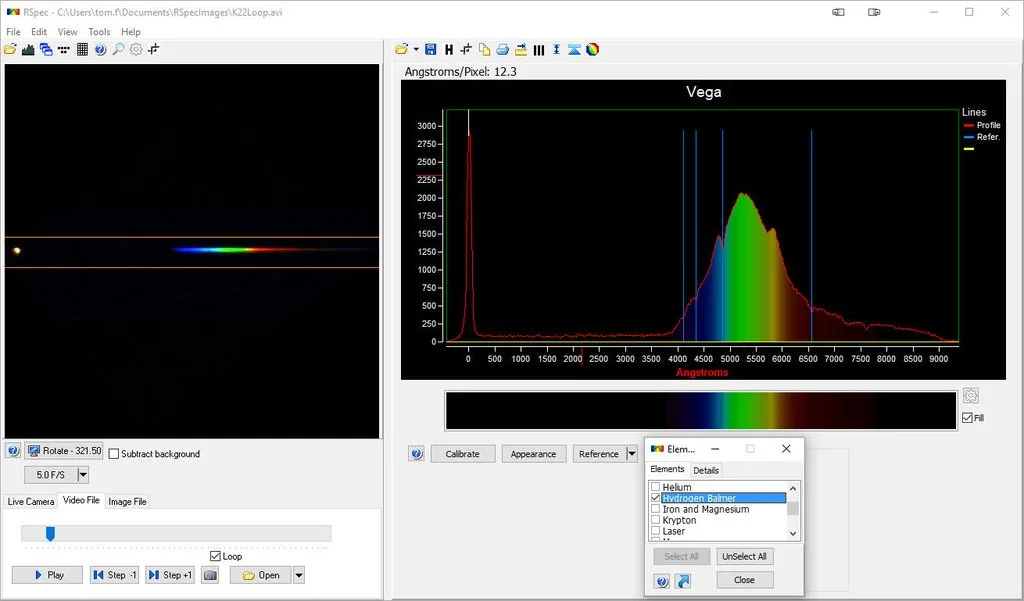
Point your telescope at a bright star (e.g., Vega or Arcturus), focus, and place the star's image on the grating. Take a short exposure (0.1–1 second) to avoid saturation. In RSPEC, open the image, select the star's spectrum line, and click 'Create Spectrum'. The software will produce a graph of intensity vs. wavelength. Start with a bright star and short exposure to avoid overexposing the spectrum.
How do I calibrate the wavelength axis?
Use the built-in calibration tool. First, identify a known spectral line (e.g., the Balmer H-alpha line at 656.3 nm). In RSPEC, click 'Calibrate', enter the known wavelength, and the software will stretch or shift the axis to match. Save the calibration profile for future sessions. Save your calibration profile after the first successful calibration—you can reload it for similar setups.
Can I analyze spectra from one-shot color cameras?
Yes. RSPEC automatically separates the Bayer matrix into red, green, and blue channels. You can view the spectrum from each channel or combine them. The software also corrects for the camera's color response curve if you upload a flat-field frame. Use a flat-field frame to correct for the camera's color response—this improves the accuracy of your spectrum.
Product facts
-
RSPEC Astronomical Spectroscopy Software: RSpec includes a collection of short tutorial videos and is described by Sky & Telescope as having a gentle learning curve. You can start producing calibrated spectra within your first session without reading a manual, making it ideal for beginners.
RSPEC Astronomical Spectroscopy Software


