Quick answer
To get the most from your Seas of Havoc Premium Insert, unpack it fully, sort components by type, and follow the insert's modular layout rather than forcing pieces into old baggies. Pack in reverse order of play: store rarely used tokens first and keep captain decks and damage markers on top. This cuts setup time and protects cards and miniatures.
Seas of Havoc
Why the Premium Insert Changes Your Setup Routine
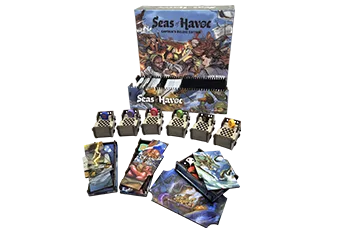
The Seas of Havoc Premium Insert is an illustrated modular storage solution designed for the captain's deluxe or base box, including the First Mates expansion. Unlike generic foam or plastic trays, it uses dedicated slots that match the game's component types, so you spend less time digging and more time playing. The key difference is intentional placement: each well is sized for a specific group of components, which means you need to learn the layout before you start packing.
If you are used to bagging everything together, the insert will feel restrictive at first. That is the point. Once you internalize where cards, tokens, and ships belong, setup becomes a repeatable two-minute task instead of a ten-minute sorting exercise.
Step 1: Unpack and Identify Every Insert Piece
Before you remove any game components from their original packaging, lay out all insert trays on a clean, flat surface. Count the trays and compare them to the insert's included diagram or the product images. The Seas of Havoc Premium Insert is modular, so some trays may stack or nest. Identify which tray is intended for cards, which for tokens, and which for larger pieces like ships or captain standees.
Common mistake: assuming every tray must be used in every configuration. If you own only the base game, some expansion-specific trays may be optional. Check the insert's documentation or the product listing for guidance. Checkpoint: you should be able to name the purpose of each tray before you load anything.
Step 2: Sort Components by Category, Not by Player
The biggest packing error is sorting components by player color or faction. The insert is designed around component type: one area for cards, one for tokens, one for ships. Start by grouping all cards (captain decks, damage cards, reference cards) together, then all tokens (infamy, damage, status), then all large pieces. This matches the insert's wells and prevents cross-contamination between slots.
If you use aftermarket sleeves, measure a sleeved card against the card well before committing. Sleeved cards are thicker and may not fit in every slot. If a well is too tight, move that deck to a larger compartment rather than forcing it. Checkpoint: every card stack should slide in without bending.
Step 3: Load the Insert from the Bottom Up
Pack the deepest or least frequently accessed trays first. These are usually the ones that sit at the bottom of the box and hold tokens or expansion components you do not need every game. Then add the mid-layer trays for cards and ships. Finally, place the top-layer trays that hold the components you need during play, such as damage markers and captain decks.
This bottom-up order matters because the insert is modular: if you start with the top tray, you may block access to lower wells or create an unstable stack. Common mistake: putting heavy trays on top of lighter ones, which can crush card wells over time. Checkpoint: the box lid should close with minimal resistance and no bulging.
Step 4: Pack for Your Next Game, Not for Long-Term Storage
The insert is a play aid, not just a storage box. Pack it so that the components you need first are the easiest to reach. For Seas of Havoc, that usually means captain decks, movement cards, and damage tokens should be in the top layer. Infamy tokens and expansion-only components can go deeper. If you play with the First Mates expansion regularly, keep its components in a dedicated tray that you can lift out as a unit.
Common mistake: packing everything perfectly flat and then having to disassemble the entire box to reach a single token type. Checkpoint: you should be able to set up a standard game by removing no more than two trays.
Step 5: Label Trays and Keep a Reference Photo
Even a well-designed insert can become confusing after a few months. Use removable labels or a marker on painter's tape to name each tray's contents. Take a photo of the fully packed box from above and keep it in your phone or inside the lid. When you or a friend repacks after game night, the photo prevents misplaced components.
This is especially useful if you own multiple board games with inserts. A quick photo saves you from re-sorting. Checkpoint: a new player should be able to repack the box correctly using only your labels and photo.
Seas of Havoc insert setup steps at a glance
- Unpack and identify trays: Lay out all insert pieces and match them to the diagram before loading any components. Checkpoint: every tray has a known purpose.
- Sort by component type: Group cards, tokens, and large pieces separately instead of by player color. Checkpoint: sleeved cards slide in without bending.
- Load bottom-up: Start with deep, rarely used trays and finish with top-layer play components. Checkpoint: lid closes without bulging.
- Pack for play access: Keep captain decks and damage tokens in the easiest-to-reach trays. Checkpoint: setup requires removing two trays or fewer.
- Label and photograph: Use removable labels and a top-down photo to make repacking foolproof. Checkpoint: anyone can repack correctly using your system.
Product facts
- Seas of Havoc: Premium Insert: Get the premium illustrated modular insert that stores all of the gameplay content in the captain's deluxe or base box including the new First Mates expansion. This insert is designed to hold everything in one box, which means you can skip separate expansion boxes and reduce shelf clutter. It also confirms compatibility with both the base and deluxe editions.