Smart ceiling fans bring a new level of convenience to your home, allowing you to control speed, lighting, and schedules from your smartphone or voice assistant. But when the connection drops, that convenience quickly turns into frustration. A fan that won't respond to your app or voice commands can disrupt your entire smart home routine.
In this guide, we'll walk you through common connectivity issues and provide practical tips to keep your smart fan online. Whether you're dealing with a temporary glitch or a persistent problem, these steps will help you get your fan back under control—and keep it that way.
Why Smart Fan Connectivity Matters
A smart ceiling fan is more than just a cooling device; it's an integral part of your smart home ecosystem. With features like remote control, scheduling, and integration with voice assistants, a stable connection ensures you can adjust your fan without getting up. When connectivity fails, you lose these conveniences, and in some cases, the fan may even stop responding to manual controls if the smart module is unresponsive.
Maintaining a strong Wi-Fi connection is key to enjoying the full benefits of your smart fan. Whether you have a model like the Alessandra Tropical 5 Blade LED Ceiling Fan or another popular smart fan, understanding the factors that affect connectivity can save you time and frustration.
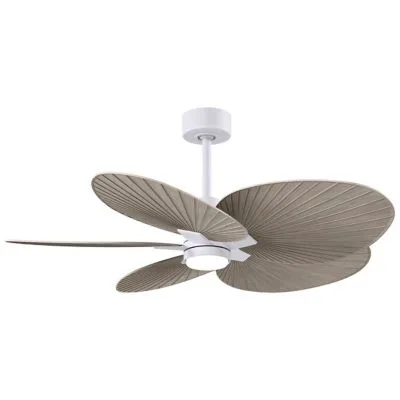
Alessandra Tropical 5 Blade LED Ceiling Fan
Common Connectivity Issues and How to Fix Them
One of the most common issues is the fan dropping off the network after a power outage or router restart. In such cases, the fan may need to be re-paired with your Wi-Fi network. Another frequent problem is interference from other devices, especially if your fan is far from the router or separated by thick walls.
Sometimes, the issue lies within the fan's app. Outdated firmware or app versions can cause connection errors. Make it a habit to check for updates regularly. If you're using a smart fan that connects via a hub, ensure the hub is properly connected and powered.
- Restart your router and fan: Power cycle both devices to clear temporary glitches.
- Check your Wi-Fi band: Some smart fans only support 2.4GHz, so ensure your phone and fan are on the same band.
- Update the fan's firmware and the app to the latest versions.
- Move the fan closer to the router temporarily to test signal strength.
How to Reset Your Smart Fan
If basic troubleshooting fails, a factory reset often resolves persistent connectivity problems. The reset process varies by brand, but typically involves holding a button on the fan's control unit or using a specific sequence with the remote. For example, on many smart fans, you may need to press and hold the 'Pair' or 'Learn' button for 5-10 seconds until the indicator light blinks.
After resetting, you'll need to set up the fan again through the app. This usually involves putting the fan into pairing mode and re-entering your Wi-Fi credentials. While this might sound tedious, it's the most effective way to clear corrupted settings and establish a fresh connection.
Optimizing Your Wi-Fi for Smart Devices
Your home network plays a crucial role in smart fan connectivity. If you have many devices connected, your router might be overwhelmed, causing intermittent drops. Consider upgrading to a mesh Wi-Fi system for better coverage, especially if your fan is in a far corner of the house.
Also, avoid placing your router near large metal objects or appliances that can cause interference. If your router supports both 2.4GHz and 5GHz bands, create a separate network for your smart devices to reduce congestion and ensure compatibility.
When to Seek Professional Help
If you've tried all the tips above and your fan still won't connect, there might be a hardware issue. Check the fan's warranty and contact the manufacturer's support. Sometimes, the smart module inside the fan may need replacement. In such cases, a professional electrician or the manufacturer's service team can assist.
Remember that some smart fans, like the Alessandra Tropical 5 Blade LED Ceiling Fan, come with detailed manuals and customer support. Don't hesitate to reach out if you're stuck.
Maintaining your smart ceiling fan's connectivity doesn't have to be a headache. By following these tips—resetting your fan, optimizing your Wi-Fi, and keeping firmware updated—you can enjoy seamless control and a more comfortable home. For a reliable smart fan that's worth the effort, consider exploring our collection of smart ceiling fans, such as the Alessandra Tropical 5 Blade LED Ceiling Fan, designed to integrate smoothly into your smart home setup.