Quick Answer
The Space Invaders Joystick Player by My Arcade is a portable arcade machine that lets you blast aliens on the go. Its authentic joystick and classic visuals recreate the original arcade experience in a compact, travel-friendly design.
Why the Joystick Player Format Works for Space Invaders
Space Invaders relies on precise horizontal movement and rapid firing. The joystick player format gives you a dedicated arcade stick that feels closer to the original cabinet than a standard handheld d-pad. This makes it easier to slide your ship left and right without accidentally drifting, which is critical when aliens speed up in later waves.
One trade-off: the joystick player is larger than a pocket-sized handheld, so it won't slip into a jeans pocket. But it still fits easily in a backpack or tote, making it a solid choice for trips, lunch breaks, or casual gaming at home.
What You Get Out of the Box
The Space Invaders Joystick Player comes pre-loaded with the classic arcade version of Space Invaders. It includes a full-color display, a responsive joystick, and a fire button. The unit runs on batteries or USB power, so you can play without being tethered to a wall outlet.
Because it's a dedicated single-game device, you don't have to navigate menus or select from a library. Just power on and start blasting. That simplicity is part of its charm, but if you want multiple games in one device, a multi-game handheld would be a better fit.
How to Get the Most Out of Your Space Invaders Joystick Player
- Power On and Adjust the Volume: Slide the power switch on the side of the unit. Use the volume wheel to set a comfortable level. Common mistake: leaving the volume too low in a noisy environment, which makes it hard to hear the iconic sound effects that help you track alien movement. Test the volume in your play setting before starting a serious run.
- Get Comfortable With the Joystick: Hold the unit with both hands. Use your thumb or palm on the joystick for horizontal movement. Press the fire button with your other thumb. Common mistake: gripping the joystick too tightly, which causes jerky movement and makes it harder to dodge enemy fire. A light touch on the joystick gives you better control, especially in later waves.
- Learn the Alien Patterns: Aliens move side to side and drop one row each time they reach the screen edge. Focus on the bottom rows first because they are closer and fire more often. Common mistake: shooting randomly instead of targeting the aliens that are about to fire, which leads to unnecessary deaths. Prioritize aliens that are directly above or near your ship.
- Use the Bonus UFO Wisely: A small UFO appears occasionally at the top of the screen. Shooting it earns bonus points. Common mistake: chasing the UFO while ignoring the main alien formation, which lets the aliens drop too low and costs you a life. Only go for the UFO when the alien formation is high and you have a clear shot.
- Manage Your Lives and Shields: You start with three lives. Use the four bunkers at the bottom for cover, but remember they degrade with each hit. Common mistake: hiding behind a bunker for too long, which causes it to wear down quickly and leaves you exposed. Move between bunkers and peek out to fire instead of staying behind one shield.
Product Facts
-
Space Invaders Joystick Player: Space Invaders is one of the most popular arcade games of all time, featuring classic arcade visuals and iconic alien enemies. You get an authentic retro experience that captures the look and feel of the original 1978 arcade cabinet, not a modern reinterpretation.
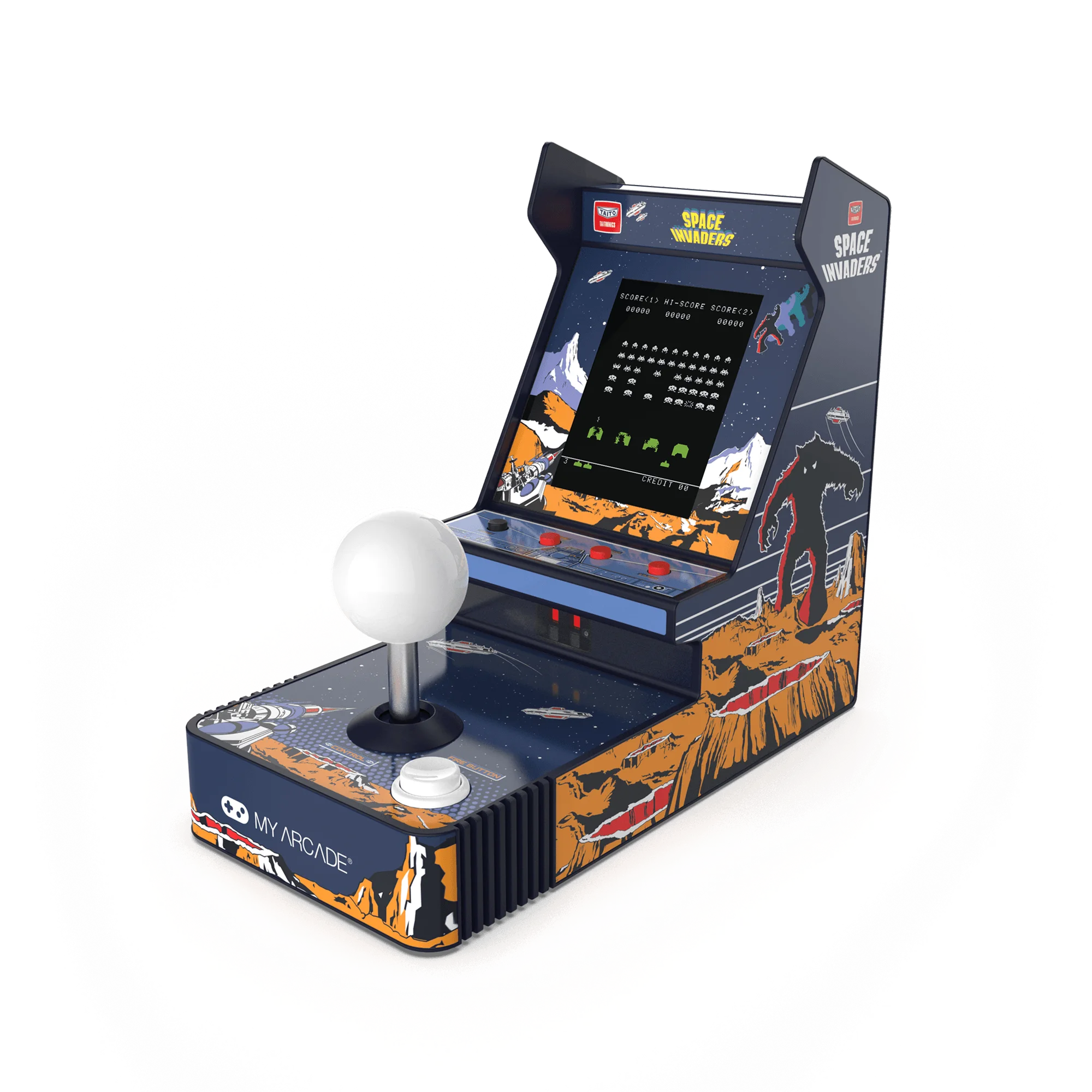
Space Invaders Joystick Player