Quick answer
Set up your Spypoint Link Micro S by charging the internal battery, activating the cellular plan, and positioning the camera with the integrated solar panel facing south for maximum sun exposure.
Why the solar panel changes your setup routine
The Link Micro S has a built-in solar panel that keeps the battery topped off, so you don't need to swap batteries as often. But that panel only works well if it gets direct sunlight for several hours a day. A shady spot or north-facing placement will drain the battery faster than the panel can recharge.
If you hunt in dense forest or deep north-facing slopes, the solar panel may not keep up during winter months. In those cases, plan to check the camera more often or carry a backup power source.
Cellular plan and SIM card: what to expect
The Link Micro S uses a cellular connection to send photos to your phone. You need an active Spypoint plan or a compatible third-party SIM. The camera ships without a SIM installed, so you have to insert one before powering on.
Coverage depends on your carrier. In remote areas, test the signal strength indicator during setup. If the signal is weak, try a higher mounting position or relocate to a clearing. The camera won't send images without a reliable connection.
Step-by-step setup guide
- Charge the internal battery: Before first use, charge the camera's internal battery fully via the USB-C port. A full charge takes about 6-8 hours. The solar panel maintains the charge but won't fill a completely dead battery quickly. Skipping the initial full charge can cause the camera to shut down early in the field.
- Insert the SIM card and activate the plan: Open the SIM slot on the side of the camera and insert the micro-SIM from your carrier or Spypoint kit. Power on the camera and follow the on-screen prompts to activate the plan. Write down the camera's serial number — you'll need it for the app. Make sure the SIM is unlocked and data-enabled. A locked SIM will show 'No Service' even with good signal.
- Mount the camera facing south (northern hemisphere): Position the camera so the solar panel gets direct sunlight for most of the day. In the northern hemisphere, that means facing south or southwest. Use the adjustable bracket to tilt the panel toward the sun. Avoid tree trunks that cast shadows on the panel. A north-facing mount can drain the battery in under two weeks during cloudy weather.
- Set detection zone and test trigger: Walk in front of the camera at the expected animal path distance (10-30 ft). Adjust the sensitivity setting in the app or on the camera menu. The Link Micro S has a 0.5-second trigger speed, so it catches fast-moving animals, but tall grass in front of the lens can cause false triggers. Clear vegetation within 5 ft of the lens to reduce false triggers from wind-blown grass.
- Check signal strength and send a test photo: After mounting, send a test photo from the camera menu. Wait 2-3 minutes for the image to appear in the Spypoint app. If it doesn't arrive, check the signal bars on the camera display. One bar may still work, but two or more is reliable. If the test photo fails, move the camera higher or to a clearing before leaving the site.
Product facts
-
Caméra de Chasse Cellulaire Spypoint Link Micro S - Camouflage: Integrated solar panel provides unlimited autonomy in direct sunlight. You can leave the camera in the field for months without changing batteries, as long as the panel gets enough sun.
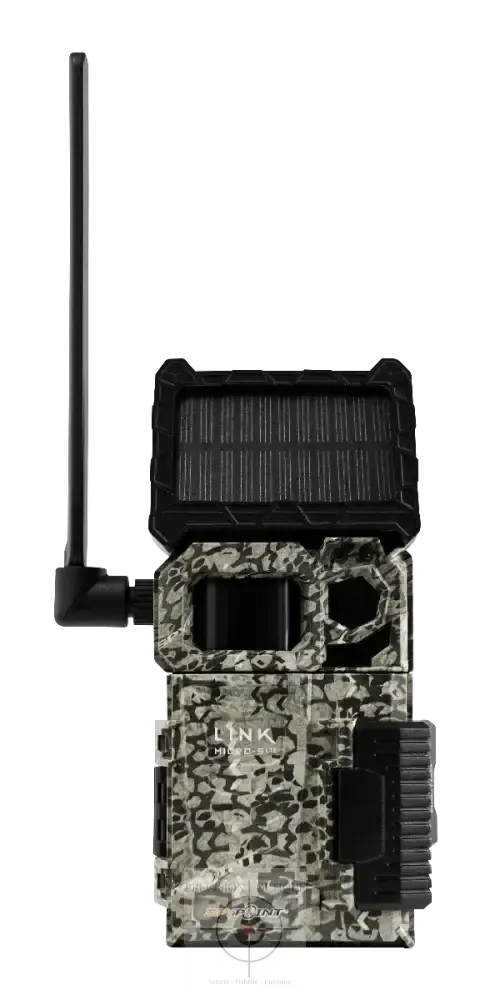
Caméra de Chasse Cellulaire Spypoint Link Micro S - Camouflage