Quick answer
Clean your Circuit Cubes tire 43.2 x 14 #56898 regularly with a soft brush and mild soap to remove debris that reduces traction. Inspect for cuts or flat spots after each session to catch wear early and extend its life.
Why regular tire care matters for robot builds
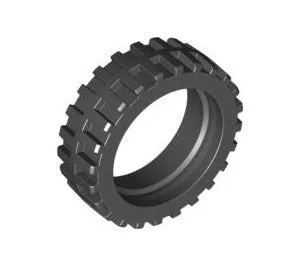
The Tire - 43.2 x 14 - #56898 is a small rubber part that directly affects how your robot or vehicle moves. Dirt, hair, and grit can get lodged in the tread, causing slippage or uneven wear. Cleaning it after a few runs keeps traction consistent and prevents the tire from becoming lopsided.
Because this is a single replacement tire, you might be using it alongside other wheels. A clean tire with good grip helps the whole drive train stay balanced. If you notice your robot pulling to one side, a dirty or worn tire is often the culprit.
When to replace vs. clean
Cleaning handles surface dirt and small debris. If you see cuts, chunks missing, or a flat spot that doesn't come out after cleaning, the tire has worn past its useful life. The Tire - 43.2 x 14 - #56898 is an affordable part, so replacing it is better than compromising your build's performance.
How to clean and care for your Circuit Cubes tire
- Remove the tire from the wheel hub: Gently pull the tire off the plastic hub. If it's tight, work your fingers around the edge to avoid tearing the rubber. Set the hub aside. Checkpoint: If the tire tears during removal, it's time for a replacement.
- Brush off loose debris: Use a soft-bristled brush (an old toothbrush works well) to dislodge dirt, hair, and dust from the tread. Pay extra attention to the grooves where grit likes to hide. Checkpoint: Avoid using metal brushes or sharp tools that can cut the rubber.
- Wash with mild soap and water: Mix a few drops of dish soap with warm water. Dip a cloth or sponge and wipe the tire surface. Rinse with clean water and pat dry with a lint-free cloth. Checkpoint: Do not soak the tire or use harsh chemicals like acetone or alcohol—they can dry out and crack the rubber.
- Inspect for wear and damage: Hold the tire up to the light and look for cuts, flat spots, or uneven wear. Rotate it slowly to check the entire circumference. If the tread is smooth in one area, the tire is worn. Checkpoint: A worn tire reduces traction and can make your robot drift or stall on turns.
- Reinstall and test traction: Press the clean, dry tire back onto the hub. Make sure it sits evenly all the way around. Place the wheel on your build and run it on a flat surface to confirm smooth rolling. Checkpoint: If the wheel wobbles, the tire may not be seated properly or the hub could be damaged.
Product fact
-
Tire - 43.2 x 14 - #56898: The Tire - 43.2 x 14 - #56898 is a replacement part from Circuit Cubes | Tenka Inc., offered in the Parts category. This listing provides one tire, identified by the product number 56898. Knowing it's a single tire helps you plan to buy multiples for builds that need four wheels, and the specific product number makes reordering easy.
Tire - 43.2 x 14 - #56898