Quick answer
To convert the Travelpro Altitude Convertible Duffel/Backpack, empty the bag, unzip the back panel, pull out the hidden backpack straps, and clip them into place. For duffel mode, unclip and tuck the straps back into the stowed position, then zip the panel closed. Always switch modes before loading the bag, and test the strap anchors with a light pull.
Why the Altitude switches modes so easily
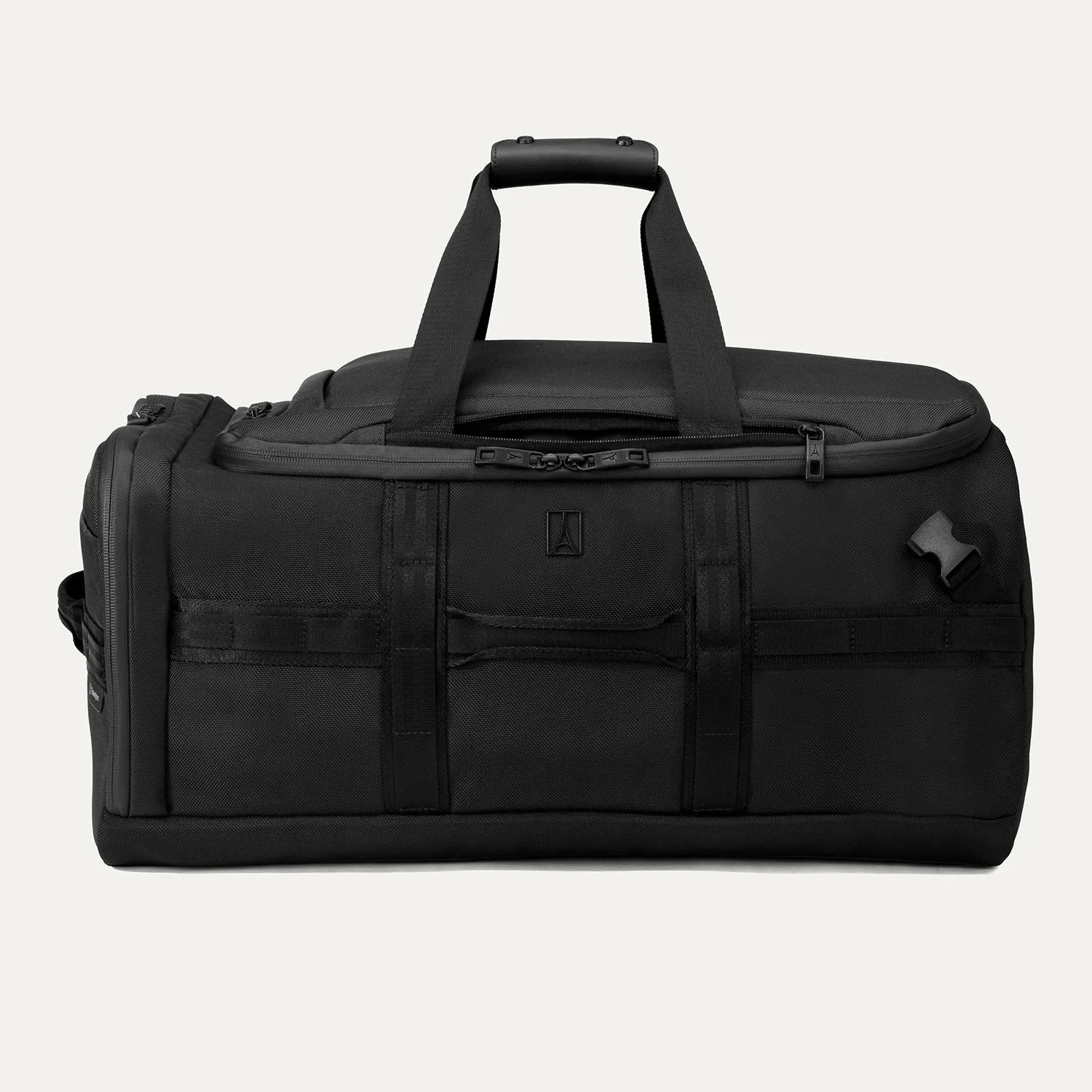
The Altitude Convertible Duffel/Backpack is built for people who take one bag through different phases of a trip. It is carry-on sized and made with ECOFAB fabric from 100% recycled plastic, so it works for road trips, backpacking adventures, and air travel. The hidden straps are the key: they stow away when you want a clean duffel profile, then deploy when you need both hands free. That versatility is the whole point, but it only pays off if you switch modes correctly.
Before you start: empty the bag and check the panel
Conversion is a two-minute job when the bag is empty. If the main compartment is packed, you will struggle to reach the strap compartment and may force the zipper. Empty the bag, lay it flat with the back panel facing up, and locate the zipper that hides the backpack straps. Check that the zipper is free of fabric snags before pulling. A common mistake is trying to convert a full bag; the straps can get twisted or the zipper can catch.
Step-by-step: duffel to backpack
Follow this order to avoid fighting the bag. Each step includes a checkpoint so you know it is done right.
- 1. Unzip the back panel. Open the zipper fully and fold the flap out of the way. Checkpoint: the strap compartment should be completely exposed, with no fabric covering the straps.
- 2. Pull out both backpack straps. Grab the straps at the top and pull them out evenly. Checkpoint: the straps should hang free without twists or knots.
- 3. Clip the straps into the anchors. Connect each strap to its matching clip at the bottom of the panel. Checkpoint: tug each strap firmly; the clip should not release or slide.
- 4. Adjust the strap length. Put the bag on your back and tighten or loosen the straps until the bag sits high and close to your body. Checkpoint: the bag should not sag below your waist or bounce when you walk.
- 5. Tuck away the duffel handles. If your bag has carry handles, fold them flat against the side so they do not rub your back. Checkpoint: no loose webbing should dangle behind you.
Step-by-step: backpack to duffel
Switching back is just as quick, but the order matters. Do this before you load the bag for a flight or car trip.
- 1. Unclip the backpack straps. Press the release on each clip and pull the straps free. Checkpoint: both straps should be completely detached from the anchors.
- 2. Lay the straps flat inside the compartment. Fold or coil them so they lie flat against the back panel. Checkpoint: no strap should cross over the zipper track.
- 3. Zip the panel closed. Close the zipper fully, guiding the pull around the corners. Checkpoint: the panel should sit flat with no bulges.
- 4. Test the duffel carry. Grab the top handle and lift. Checkpoint: the bag should feel balanced and the hidden straps should stay put.
Which carry mode for which situation
Use backpack mode when you need both hands free or when you will walk more than a few minutes: airport transfers, train platforms, or a hike to your lodging. Use duffel mode when you want a clean, compact profile for overhead bins, car trunks, or short carries. The Altitude is carry-on sized, so it fits most domestic airline overheads, but always check your specific airline's size limits. If you are packing for a flight, convert to duffel mode after security so the straps do not catch on seats or overhead bin latches.
Common mistakes and how to avoid them
Most problems come from rushing the switch. Do not force the zipper if it catches; back up and realign the fabric. Do not leave the backpack straps hanging loose in duffel mode; they can snag on conveyor belts or car doors. Do not overpack the bag in backpack mode; a heavy load shifts the weight to your shoulders and makes the straps dig in. And do not assume the straps are self-stowing; you must manually tuck them into the compartment and zip it closed.
Conversion steps at a glance
- Empty the bag first: Remove all contents and lay the bag flat with the back panel facing up. Checkpoint: the bag should be light enough to flip and zip without resistance.
- Unzip the strap compartment: Open the back panel fully and fold the flap out of the way. Checkpoint: the hidden straps are completely exposed.
- Deploy or stow the straps: For backpack mode, pull out the straps and clip them into the anchors. For duffel mode, unclip and lay them flat inside the compartment. Checkpoint: straps are either securely clipped or fully tucked with no twists.
- Zip and test: Close the panel zipper completely, then lift the bag by the handle or wear it to test balance. Checkpoint: the bag feels stable and no straps are loose.
Product facts
- Altitude™ Convertible Duffel/Backpack: The carry-on sized Travelpro Altitude Convertible Duffel/Backpack transforms from a spacious duffel to a backpack with hidden straps that stow away when not in use. You get two carry options in one bag, so you can switch to backpack mode for hands-free walking and back to duffel mode for a streamlined profile.
- Altitude™ Convertible Duffel/Backpack: It is built with ECOFAB fabric made from 100% recycled plastic. The durable fabric handles road trips and backpacking adventures while reducing reliance on new plastic.