What the MT85 actually does before you unbox it
The Ulanzi MT85 Automatic Pop-Up Phone Tripod is built around one idea: you put it down and the legs deploy on their own, so there is no fumbling with stiff legs while you are holding a coffee or a second bag. It is a phone-first tripod with a magnetic mounting system, a Bluetooth remote, and a folded height of 28.5cm/11.2inch that fits in a side pocket or a small daypack.
Two numbers decide whether it suits your shoot. The center column holds up to 1kg/2.2lb, while the joint is rated for 400g/0.88lb. Your phone plus a case plus a magnetic ring adds up faster than most people expect, so check that total before you extend the tripod to full height.
Setting up the MT85 in the right order
Work through these in sequence. Doing the mounting before the extension keeps the tripod balanced while you handle the phone.
- 1. Set the tripod down on a flat surface: Place it down and let the four legs snap open. The four-leg design with non-slip pads is meant to keep it steady, but the surface still matters more than the tripod — avoid loose sand, sloped ledges and windy railings.
- 2. Attach the magnetic ring to your phone: The box includes a Magnetic Ring. Fit it to your phone or case first so the magnetic mount has something to grip. The record does not describe ring installation steps, so follow the printed manual in the box rather than guessing.
- 3. Mount the phone on the magnetic side: The mount is dual-sided: the front side holds 20N and the back side holds 25N, both using N52 magnets. That means you can put your phone on one face and a small accessory on the other, or flip the setup to suit your framing.
- 4. Extend to your working height: The tripod uses seven twist-to-lock sections and reaches 1.48m in tripod mode, with the floor stand mode listed at 1.5m. Lock each section as you go rather than extending everything at once.
- 5. Take out the remote and pair it: Slide the remote down out of its slot. It works over Bluetooth at up to 10m and supports iOS, Android and HarmonyOS. Photo and video modes are switched on your phone, not on the remote.
- 6. Frame your shot: Multi-axis folding and rotation let you adjust the angle. Set the angle before you walk away, then use the remote to trigger the shot.
Weight and height limits worth checking first
-
Ulanzi MT85 Automatic Pop-Up Phone Tripod (Magsafe): Load Capacity: Center Column 1kg/2.2lb, Joint 400g/0.88lb The joint limit is the tighter of the two. A heavy phone with a chunky case and accessories can approach 400g, so weigh your setup if you plan to extend the tripod fully.
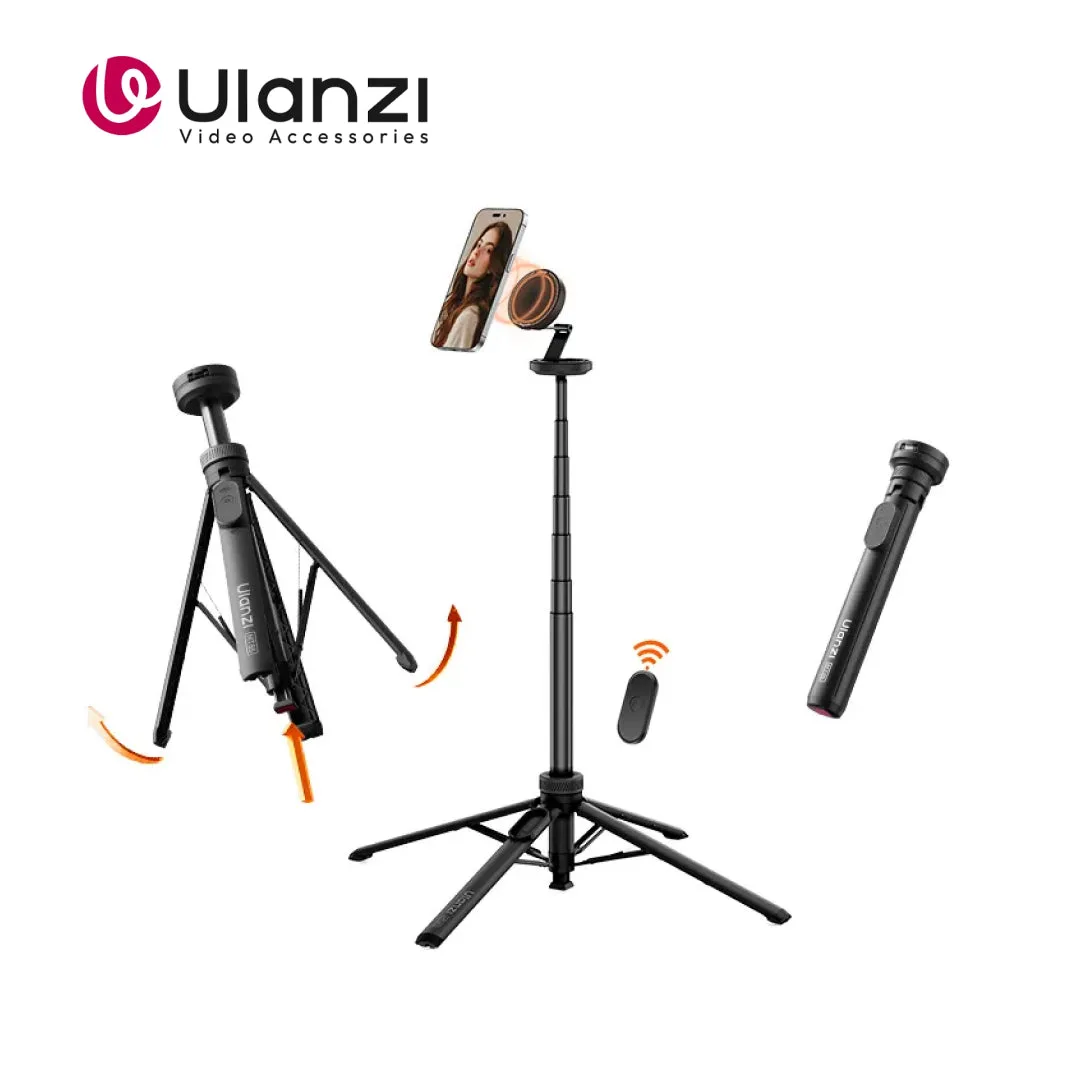
Ulanzi MT85 Automatic Pop-Up Phone Tripod (Magsafe)
-
Ulanzi MT85 Automatic Pop-Up Phone Tripod (Magsafe): With 7-section extension and a max height of 1.48m Full height is useful for full-body shots, but it also puts more leverage on the joints. Keep the load modest when you extend all the way.
-
Ulanzi MT85 Automatic Pop-Up Phone Tripod (Magsafe): Weight: ≈385g/0.85lb The tripod itself is light enough to carry all day, which is the main reason to choose it for travel over a sturdier full-size stand.
Magsafe mounting: what the magnets do and do not do
The dual-side magnetic mount is the part people ask about most. With 20N on the front and 25N on the back, the MT85 gives you a quick, tool-free way to attach a phone and a second small item at the same time. That is genuinely handy for a livestream or a vlog where you want the phone plus a small light or mic.
What the supplied information does not confirm is whether the mount works with every Magsafe-compatible case, or how the magnets behave with thicker cases and non-magnetic phones. Treat the included Magnetic Ring as the reliable path, and test the hold with a gentle shake before you trust it at height. If you need a mount that clamps rather than magnets, a clamp-style option such as the Ulanzi ST-14 Tripod Mount for Smartphone Video is a different tool for a different job.
Tripod mode vs floor stand mode
The MT85 lists two working configurations, and picking the right one changes how stable your shot feels.
- Tripod mode: Extended height is listed at 150cm/59.1inch. Use this on a table, desk or counter where the legs have a flat, firm base and you want an eye-level or slightly-above framing.
- Floor stand mode: Extended height is listed at 1.5m. Use this on the ground for full-body shots and hands-free recording, keeping in mind that the higher the extension, the more the joint rating matters.
Checkpoints before you walk away from the shot
- Confirm the remote is paired: If the remote does not trigger, check the phone's Bluetooth settings before assuming a fault. The record gives a 10m range, not a guaranteed range through walls or bodies.
- Check the phone is in the right camera mode: Photo and video modes must be switched on the phone. The remote triggers the shutter; it does not change modes for you.
- Re-check the load: If you have added a case, a grip or a second magnetic accessory, compare the total against the 400g/0.88lb joint limit before extending fully.
- Keep the folded size in mind for packing: At 6*6*28.5cm/2.36*2.36*11.2inch folded, it slots into a water-bottle pocket. Pack it where it will not be crushed by heavier gear.
What comes in the box
- Ulanzi MT85 Automatic Pop-Up Phone Tripod (Magsafe): Included: Selfie Stick*1, Magnetic Ring*1, User Manual*1 There is no separate charger or cable listed, so plan your charging around your phone rather than the tripod.
- Ulanzi MT85 Automatic Pop-Up Phone Tripod (Magsafe): Supported Systems: iOS, Android, HarmonyOS Check your phone's system against this list before you rely on the remote for a shoot.