What This Kit Offers for Green Screen Video
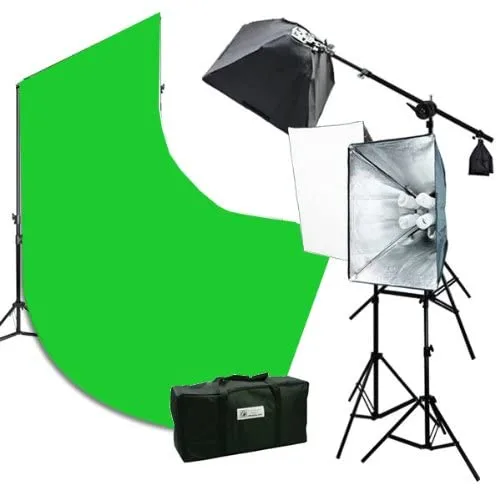
The 2400 Watt Continuous Video Photography Studio Chromakey Green Screen Lighting Kit is built specifically for studio portraits, photography, and video work. It includes three light stands (each extending to 6.5 ft), three 16"x24" softboxes, a 8 ft tall by 10 ft wide background stand, and a 10x20' green backdrop. The kit also comes with 12 daylight-balanced bulbs (45W each, 5500K) and a carrying case for transport.
For green screen video, the key advantage is continuous lighting — you see exactly how the light falls on your subject and backdrop before you hit record. The softboxes diffuse the light, reducing harsh shadows that can cause uneven chromakey results.
Setting Up the Kit for Chromakey Video
The goal is to light both the green backdrop evenly and your subject separately, avoiding shadows and hot spots that make keying difficult.
- Assemble the background stand and backdrop: The kit includes a 4-section background stand that extends to 8 ft high and 10 ft wide. Set it up behind your subject, then drape the 10x20' green backdrop over it. Smooth out wrinkles — creases cast shadows that can interfere with chromakey.
- Position the three light stands: Each light stand extends to 6.5 ft. Place two stands on either side of the green backdrop, angled toward the background to create even illumination. Position the third stand for your subject, slightly in front and to one side, with the softbox aimed at the subject's face.
- Install bulbs and softboxes: Each light socket holds four 45W 5500K daylight bulbs. The 12 bulbs included are equivalent to 2400W total. Attach the 16"x24" softboxes over the sockets to diffuse the light — this softens shadows and reduces glare on the green screen.
- Adjust lighting for even backdrop coverage: Turn on the lights using the ON/OFF switches on each socket. Check that the green backdrop is lit evenly — no bright spots or dark corners. If needed, move the two background lights closer or farther to balance the spread.
- Light your subject separately: Use the third light with softbox to illuminate your subject. Follow the supplied product instructions for positioning relative to the green screen to avoid casting a shadow on the backdrop and to minimize green spill.
Kit Specifications That Matter for Your Setup
-
2400 Watt Continuous Video Photography Studio Chromakey Green Screen Lighting Kit: Includes 3 x 16"x24" softboxes and 12 x 45W 5500K daylight bulbs (equivalent 2400W total). The softboxes diffuse the continuous light, reducing harsh shadows that can ruin chromakey. The 5500K daylight color temperature matches video white balance standards, so colors key cleanly.
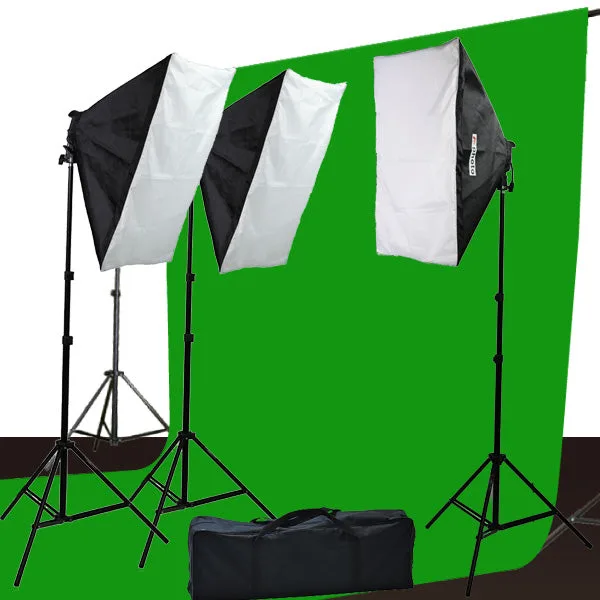
2400 Watt Continuous Video Photography Studio Chromakey Green Screen Lighting Kit
-
2400 Watt Continuous Video Photography Studio Chromakey Green Screen Lighting Kit: Light stands extend to 6.5 ft height; background stand extends to 8 ft height and 10 ft width. The 6.5 ft stands are tall enough for most seated or standing subjects. The 8 ft background stand gives you a full-height green screen for head-to-toe shots.
-
2400 Watt Continuous Video Photography Studio Chromakey Green Screen Lighting Kit: Includes 1 x 10x20' green backdrop and a carrying case. The 10x20' backdrop is large enough to cover the entire background stand width and drop to the floor, which helps avoid visible edges in frame. The carrying case makes it portable for location shoots.
Tips for Cleaner Chromakey Results
Even lighting on the green screen is the most important factor. The two softboxes aimed at the backdrop should be positioned so that the light overlaps slightly in the center — this prevents a darker strip behind your subject. Check with your camera's waveform or zebra display if available; the green backdrop should read a consistent brightness level across the frame.
Keep your subject at least a few feet from the backdrop to minimize green spill on their shoulders and hair. If you notice green reflections, you can add a backlight or rim light from behind, though this kit does not include a dedicated backlight — consider a separate small LED panel if spill becomes an issue.
Because the kit uses continuous daylight bulbs, you can adjust your camera's white balance to 5500K for accurate color. This avoids the color shifts that can happen with mixed lighting and makes the chromakey keying process more predictable in post-production.