Quick answer
Set up your green screen lighting kit by positioning the backdrop, placing two lights for even background illumination, and using a third light to separate your subject from the screen.
Why 3-point lighting matters for chroma key
The goal of green screen lighting is to create a perfectly even, shadow-free background so the keying software can cleanly remove it. Uneven lighting creates hot spots and shadows that make the key look patchy and require more cleanup in post-production.
A 3-point setup separates the background lighting from the subject lighting. Two lights are dedicated to the green screen itself, while the third light (or a separate key light) illuminates your subject. This prevents shadows from the subject falling onto the backdrop and ensures the green is uniform.
Trade-off: using a kit vs. separate lights
A dedicated green screen lighting kit like the ePhoto Premium 3 Point Chromakey Kit bundles the backdrop, stands, and lights together, which simplifies setup and ensures compatibility. However, the included 45W CFL bulbs are relatively low power, so you may need to control ambient light in the room to achieve the best results.
If you're shooting in a bright room, consider closing curtains or turning off overhead lights. The kit's 110V-only power requirement means it's designed for North American outlets, so check your power supply before use.
Step-by-step setup process
- Assemble the backdrop: Set up the muslin backdrop support cross bar and two supporting stands. Attach the green screen backdrop, ensuring it is taut and wrinkle-free. Use the mini background stand if you need a lower backdrop height. Checkpoint: Wrinkles and sagging create shadows and uneven color, so smooth out the fabric before lighting.
- Position the lights for the background: Place two light stands on either side of the backdrop, angled toward the green screen at about 45 degrees. Use the included 45W CFL bulbs with white umbrellas to diffuse the light evenly across the entire backdrop. Checkpoint: Common mistake is placing lights too close, causing a hot spot in the center. Keep them at least 3-4 feet away.
- Set up the third light for your subject: Position the third light stand in front of your subject, slightly to the side, to illuminate them without casting a shadow on the green screen. This is your key light. Checkpoint: Ensure the subject is at least 6 feet from the backdrop to prevent spill and shadows.
- Test and adjust: Turn on all lights and check the green screen for even brightness. Use a camera or your eye to look for shadows or bright spots. Adjust light angles or distances as needed. Checkpoint: The green should be uniformly lit; if not, move lights farther away or adjust the umbrella angles.
Product spotlight
-
3 Point Chromakey Green Screen Video Lighting Kit 10 x 12ft Green Chromakey Backdrop Screen Studio Light Kit: This kit includes a 10x12ft green backdrop, support stands, two 6.5ft light stands, three light holders, three 45W CFL bulbs, and two 32" white umbrellas. The included umbrellas soften the light, which helps create the even illumination needed for a clean chroma key.
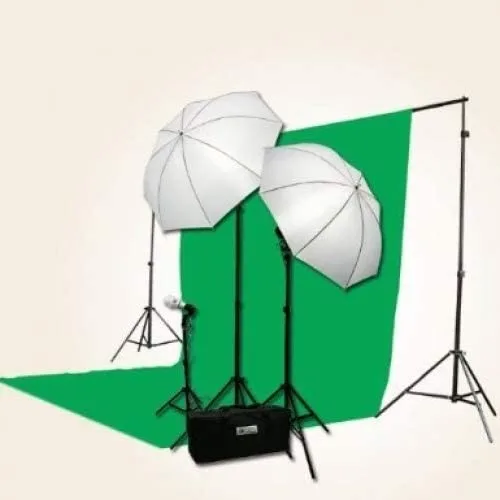
3 Point Chromakey Green Screen Video Lighting Kit 10 x 12ft Green Chromakey Backdrop Screen Studio Light Kit


