Quick answer
Choose a 3.5mm TRS cable with the right connectors and length for your specific device setup. Prioritize right-angle connectors for tight spaces and consider an extension cable when you need extra reach.
Why connector type and length matter
The most common audio connection for cameras and recorders is the 3.5mm TRS jack. But not all 3.5mm cables are the same. The connector shape (straight vs. right-angle) and the cable length affect both fit and reliability.
Right-angle connectors are ideal when your camera or recorder has a jack that's close to a surface, like a camera body. They reduce strain on the port and keep the cable out of the way. Straight connectors are simpler and often more flexible when space is not an issue.
Length is a trade-off: a longer cable gives you more freedom to move, but it can introduce noise or tangles. For most setups, a 10-inch cable is enough to connect a wireless receiver or timecode unit directly to your camera. If you need more reach, an extension cable adds length without replacing your existing cable.
Understanding the right-angle advantage
When you're mounting a wireless receiver or a timecode box on a camera cage, the audio jack is often in a tight spot. A right-angle connector lets you plug in without bending the cable sharply, which can damage the wire over time.
Some cables, like the Kondor Blue 3.5mm to 3.5mm Right-Angle Timecode Audio Cable, are designed specifically for this kind of connection. Its braided nylon construction adds durability, and the right-angle ends keep the cable close to the device, reducing the chance of accidental disconnection.
When to use an extension cable
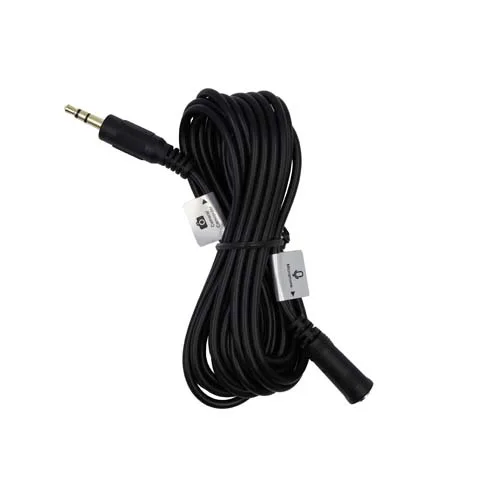
If you need to place your microphone farther from your camera, an extension cable is a simple solution. A 10-foot extension, like the ProMaster 8067, lets you keep your existing cable and add length when needed.
Extension cables are useful for interviews or vlogs where the camera is on a tripod and the mic needs to be closer to the subject. Just be aware that each connection adds a potential point of failure, so make sure all connectors are secure.
Steps to choose the right audio cable
- Identify your device's audio input: Check the audio jack on your camera, recorder, or wireless receiver. Most use a 3.5mm TRS input, but confirm the connector type (male or female) and the required plug shape. A 3.5mm TRS cable is the standard for most cameras and recorders.
- Measure the distance you need to cover: Decide if the cable will connect devices that are close together (like a receiver on a camera) or far apart (like a microphone on a boom). For close connections, a 10-inch cable is usually enough. For longer runs, consider an extension cable. Measure the actual distance between your devices before buying.
- Choose the right connector shape: If the audio jack is near a surface or in a tight spot, pick a right-angle connector to avoid bending the cable. If space is not an issue, a straight connector is simpler and often more flexible. Right-angle connectors reduce strain and help keep cables out of the way.
- Consider durability and labeling: Look for cables with braided nylon or other reinforced construction for longer life. Some cables have labels on each end to indicate which end goes to the microphone and which to the camera, reducing setup errors. A labeled cable can save time and prevent wrong connections.
- Test the cable before finalizing your setup: Plug in the cable and check that the audio signal is clear and that the connectors fit snugly. If you hear static or the connection is loose, try a different cable or connector type. Always test your cable with your actual gear to ensure compatibility.
Product facts
-
Kondor Blue 3.5mm to 3.5mm Right-Angle Timecode Audio Cable (10”): This 10-inch cable features right-angle 3.5mm connectors and a braided nylon construction. The right-angle ends reduce strain on your camera's audio jack and keep the cable tidy in tight rigs, while the braided nylon adds durability.
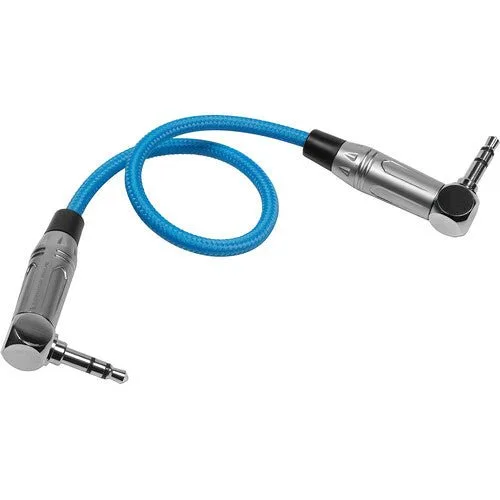
Kondor Blue 3.5mm to 3.5mm Right-Angle Timecode Audio Cable (10”)
-
Promaster Audio Cable 3.5mm TRS male right angle - 3.5mm TRS male right angle - 1 straight: This cable has 3.5mm TRS male right-angle connectors on both ends and is labeled to identify the mic and camera ends. The right-angle connectors are ideal for connecting a microphone or wireless receiver to a camera in tight spaces, and the labels help you avoid plugging in the wrong end.
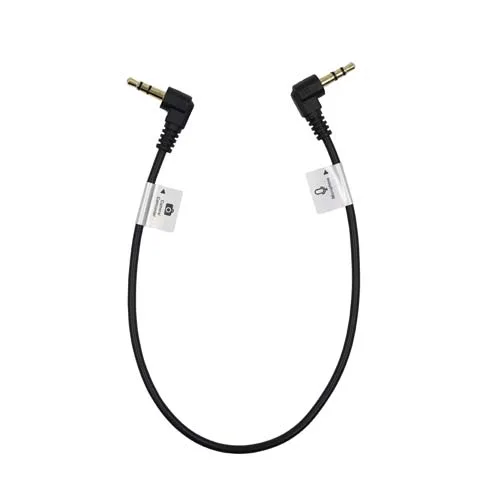
Promaster Audio Cable 3.5mm TRS male right angle - 3.5mm TRS male right angle - 1 straight
-
Promaster Audio Cable 3.5mm TRS male straight - 3.5mm TRS female straight - 10 straight extension: This 10-foot extension cable has a 3.5mm TRS male straight connector on one end and a 3.5mm TRS female straight connector on the other. It adds 10 feet of reach between your microphone and camera, giving you more flexibility in positioning without buying a new cable.