Quick Answer
Polar aligning your equatorial mount means pointing its polar axis at the celestial pole. For a quick session, use a polar scope or your mount's all-star polar alignment routine. For high precision, especially with long exposures, use the drift alignment method.
Understanding Polar Alignment Basics
Polar alignment is the process of aligning your equatorial mount's right ascension axis with the Earth's rotational axis. This ensures your mount tracks stars accurately across the sky, preventing field rotation in long-exposure astrophotography. The accuracy needed depends on your focal length and exposure time.
Before starting, level your tripod and ensure the mount is properly balanced. A rough alignment using the mount's latitude scale and a compass can get you close, but for precision, you'll need to refine using the methods below.
Choosing the Right Method
The best method depends on your setup and sky conditions. A polar scope is fast and works well if your mount has one and you can see the pole star. All-star polar alignment (available on many GoTo mounts) uses software to correct alignment using any bright star. Drift alignment is the most accurate but takes the longest, ideal for permanent setups or critical imaging.
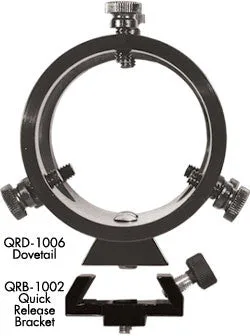
If your mount lacks a polar scope, consider adding a quick-release finder mount like the QFM-1008 to attach a finder scope for polar alignment. It converts a fixed finder mount to a quick-release type, making it easier to swap between alignment and imaging.
Step-by-Step Quick Polar Alignment
- Level and Rough Align Your Mount: Set up your tripod on solid ground and level it using the built-in bubble level. Point the mount roughly north (in the northern hemisphere) and adjust the latitude scale to your local latitude. This gets you within a few degrees. Checkpoint: A common mistake is not leveling the tripod first, which throws off all subsequent adjustments.
- Use a Polar Scope for Fine Alignment: If your mount has a polar scope, look through it and center Polaris (or Sigma Octantis in the southern hemisphere) in the reticle. Adjust the mount's altitude and azimuth bolts until the star is in the correct position for your time and date. Many polar scopes have a reticle pattern that shows where the pole star should be. Checkpoint: Make sure the polar scope is properly aligned with the mount's axis—a misaligned scope will give false results.
- Perform All-Star Polar Alignment (if available): On GoTo mounts, select the all-star polar alignment routine from the hand controller. Slew to a bright star, center it, then let the mount calculate the correction. Follow the on-screen prompts to adjust altitude and azimuth bolts until the star stays centered. Checkpoint: This method works even when the pole star is blocked by trees or buildings.
- Refine with Drift Alignment for Precision: For astrophotography with long exposures, use drift alignment. Point the telescope at a star near the celestial equator and meridian. Watch for north-south drift over 5-10 minutes and adjust azimuth. Then point to a star near the eastern horizon and adjust altitude. Repeat until drift is minimal. Checkpoint: Drift alignment is time-consuming but essential for pinpoint stars in long exposures. A common mistake is adjusting the wrong axis.
- Verify and Lock: After adjustments, tighten all altitude and azimuth bolts securely. Recheck alignment by slewing to a known star and confirming it stays centered in the eyepiece or camera frame. If it drifts, repeat the fine-tuning steps. Checkpoint: Loose bolts are a frequent cause of alignment drift during the night. Always double-check they are snug.
Product Facts
- Quick-Release Finder Mount (QFM-1008): The QFM-1008 Quick-Release Finder Mount allows the use of 50-mm finder scopes on Tele Vue ring-mounts. It includes a Dovetail (QRD-1006) and Quick Release Bracket (QRB-1002) that can convert a fixed UFM-1007 Universal Finder Mount to a quick-release type. Using a finder scope with a quick-release mount speeds up polar alignment because you can attach and detach the finder without tools, saving time during setup and breakdown.