Quick answer
Set the A4988 current limit by measuring the Vref voltage on the driver's potentiometer with a multimeter, then adjusting it until Vref matches your motor's target current using the correct formula for your board's sense resistors. Most A4988 StepStick-compatible modules use 0.1 ohm sense resistors, so the common formula is Current Limit = Vref / (8 x 0.1), or Vref = Current Limit x 0.8. If your board uses 0.05 ohm sense resistors, the formula changes to Vref = Current Limit x 0.4. Always confirm which resistors your specific module has before trusting a formula.
Why the current limit matters more than the voltage
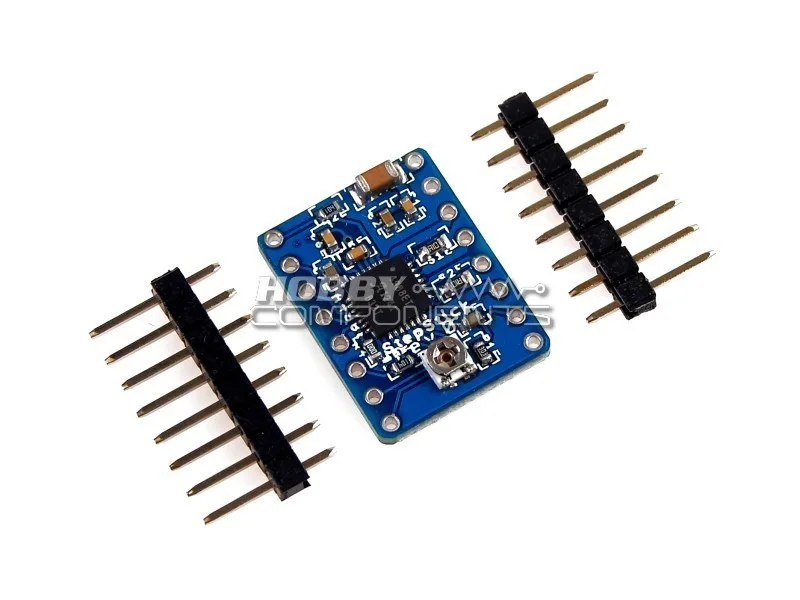
Stepper drivers like the A4988 regulate current, not voltage. The motor's rated current per phase is the number you need to respect. If you set the limit too high, the driver and motor overheat; too low, and the motor loses torque, stalls, or skips steps under load. The A4988 module is based on the Allegro A4988 driver and is used in 3D printers, CNC machines, and other builds that need precise stepper control, so the current setting directly affects print quality or machining accuracy.
A common mistake is assuming the potentiometer sets voltage to the motor. It does not. The potentiometer sets a reference voltage (Vref) that the driver compares against the voltage across its sense resistors to regulate coil current. That is why the sense resistor value is part of every correct formula.
Find your board's sense resistors and target current
Before you touch the potentiometer, identify the sense resistors on your A4988 module. They are usually small SMD resistors marked R100 (0.1 ohm) or R050 (0.05 ohm). If you cannot read the marking, check the product page or seller documentation. Do not guess. A wrong assumption here throws your current limit off by a factor of two.
Next, find your stepper motor's rated current per phase. This is on the motor's datasheet or label. For a typical NEMA 17 used in 3D printers, that number is often around 1.0 A to 1.5 A per phase, but you must verify your specific motor. As a rule of thumb, set the A4988 to about 70-80% of the motor's rated current for reliable operation without excessive heat. For example, a motor rated at 1.0 A per phase would be set to roughly 0.7 A to 0.8 A.
Measure Vref safely with the driver powered
The A4988 Vref measurement is done while the driver is powered, because the reference voltage only exists when the board has logic power. Connect the driver's logic supply (usually 5 V) and the motor supply, but do not connect or run the motor for this measurement. Place your multimeter in DC volts mode, connect the black probe to a ground pin on the driver or controller board, and touch the red probe to the metal top of the potentiometer or the designated Vref test point.
A frequent mistake is shorting the potentiometer wiper to an adjacent pin with the probe and damaging the driver. Use a fine-tip probe and steady hands. If your board has a dedicated Vref pin, use that instead of the potentiometer metal. Turn the potentiometer slowly with a small ceramic or plastic screwdriver. Metal tools can short nearby pads. Adjust until the multimeter reads your calculated Vref.
Calculate Vref for your exact module
Use the formula that matches your sense resistors. For 0.1 ohm sense resistors, Vref = Current Limit x 8 x 0.1, which simplifies to Vref = Current Limit x 0.8. So a 0.8 A current limit needs Vref = 0.64 V. For 0.05 ohm sense resistors, Vref = Current Limit x 8 x 0.05, or Vref = Current Limit x 0.4. A 0.8 A limit then needs Vref = 0.32 V.
If you are unsure which resistors your A4988 StepStick-compatible module uses, start low and measure motor temperature under load. The catalog does not list the sense resistor value for every batch, so treat the formula as a starting point and verify with a temperature check. This is a decision limitation you can work around with a multimeter and an infrared thermometer or a finger test after a short run.
Cool the driver before you blame the current setting
The A4988 is a small package with limited heat dissipation. Even at a correct current limit, it can get hot enough to thermal-shutdown or distort microstepping if it has no airflow. A small heatsink on the driver IC and a fan blowing across the driver board solve most overheating complaints. If your stepper motor overheats but the driver stays cool, the current limit is likely too high. If the driver overheats but the motor is cool, cooling is the first fix, then recheck Vref.
Do not run the driver at its absolute maximum current without cooling. The A4988 datasheet specifies thermal limits, and hobby builds rarely meet the ideal test conditions. Add the heatsink before your first long print or job, not after a failure.
Step-by-step A4988 current limit procedure
- Identify sense resistors and motor current: Read the SMD marking on the A4988 module (R100 = 0.1 ohm, R050 = 0.05 ohm) and find your stepper motor's rated current per phase from its datasheet or label. Checkpoint: If you cannot confirm the sense resistor value, do not proceed with a formula. Measure Vref and verify motor temperature under load instead.
- Calculate target Vref: For 0.1 ohm sense resistors, Vref = Current Limit x 0.8. For 0.05 ohm sense resistors, Vref = Current Limit x 0.4. Set your current limit to 70-80% of the motor's rated current per phase. Common mistake: Using the 0.8 factor on a 0.05 ohm board doubles your actual current limit and can overheat the motor.
- Power the driver and measure Vref: Apply logic power and motor power but do not run the motor. Connect the multimeter black probe to ground and the red probe to the potentiometer metal or Vref test point. Read DC volts. Checkpoint: If the reading is unstable or zero, confirm the driver has logic power and that your probe is not shorting adjacent pins.
- Adjust the potentiometer slowly: Turn the potentiometer with a small plastic or ceramic screwdriver until the multimeter reads your calculated Vref. Recheck the reading after each small turn because the potentiometer is sensitive. Common mistake: Using a metal screwdriver and shorting the potentiometer to nearby pads, which can destroy the driver.
- Add cooling and test under load: Fit a heatsink to the A4988 IC and provide airflow across the driver. Run the motor under a typical load for several minutes, then check motor and driver temperature. Next step: If the motor is too hot, lower Vref slightly. If the driver is too hot but the motor is fine, improve cooling before changing the current limit.
A4988 module facts that affect your setup
- A4988 StepStick Compatible Stepper Module: This module is based upon the Allegro A4988 stepper motor driver and is ideal for use in 3D printer, CNC, and other applications where precise control of a stepper motor is required. The A4988's current regulation is what makes precise stepper control possible, so setting Vref correctly is not optional for print quality or machining accuracy.


