Quick answer
Setting up your ASR K Chassis involves assembling the aluminum profile frame, adjusting the wheel deck and pedal tray for your gear, and mounting your seat. Follow the steps below to avoid common alignment and rigidity mistakes.
Before You Start: Tools and Workspace
Clear a large, flat area on your floor. You will need a set of metric hex keys (typically 4mm, 5mm, and 6mm), a torque wrench if available, and a soft surface to protect the aluminum profiles from scratches.
The ASR K Chassis is made to order with a lead time of 10 to 15 business days, so plan your build session after the rig arrives. Unpack all boxes and verify you have all parts against the included manual.
Understanding the Generation 2 Updates
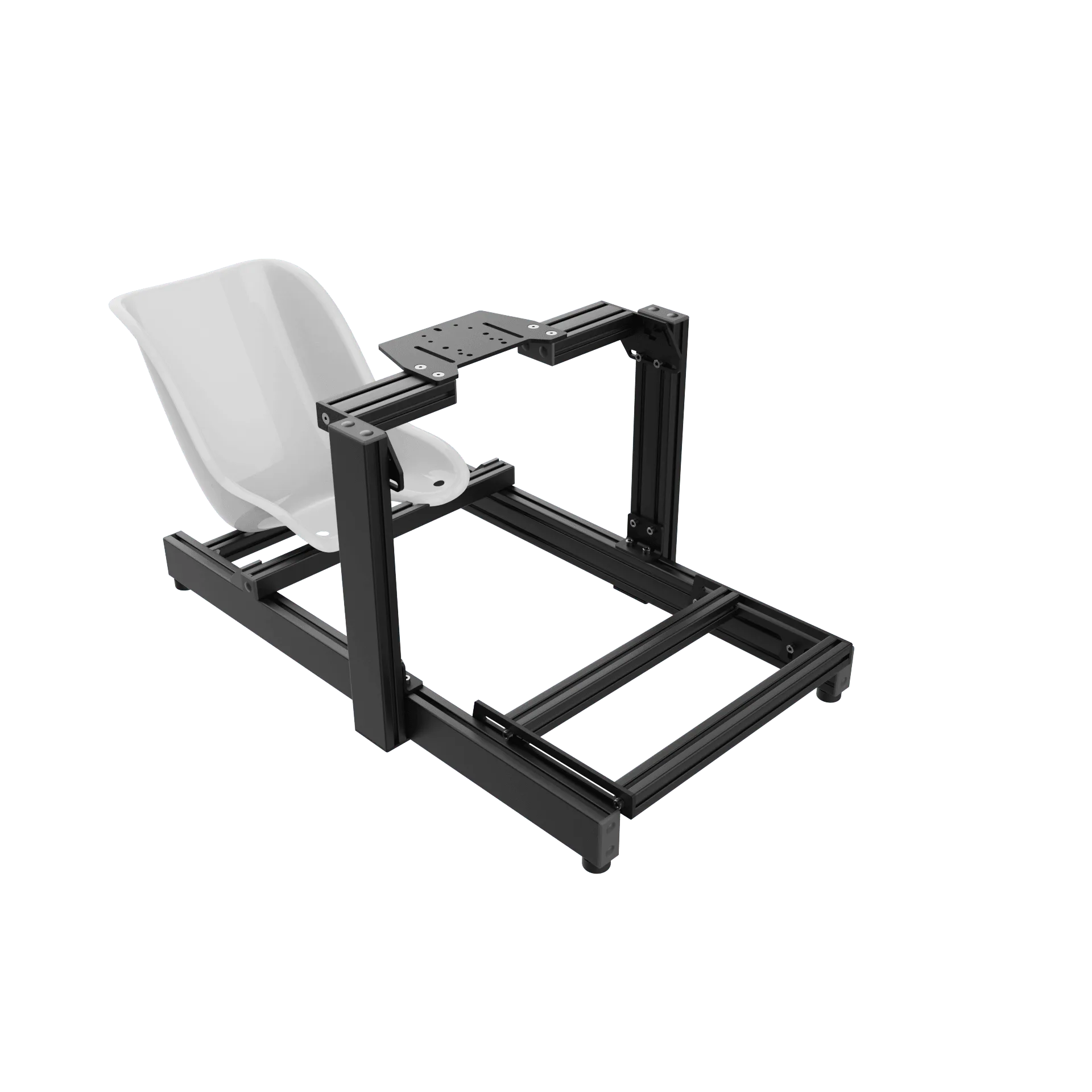
The ASR K Chassis features Generation 2 improvements including a redesigned wheel deck that offers more flexibility and adjustability for your wheelbase position. The pedal tray now uses aluminum profile cross beams and corner gussets for better compatibility and rigidity.
These updates mean you have more mounting options than previous versions, but also require careful alignment during assembly to fully benefit from the added stiffness.
ASR K Chassis Assembly Steps
- 1. Assemble the Main Frame: Start by connecting the main horizontal and vertical aluminum profiles using the supplied T-nuts and corner brackets. Keep all bolts hand-tight at this stage so you can adjust alignment later. Work on a flat surface to ensure the frame sits square. Common mistake: tightening bolts too early, which makes it impossible to correct misalignment later.
- 2. Mount the Wheel Deck: Attach the Generation 2 wheel deck to the upright profiles. The new design allows you to slide the deck forward or backward and adjust the angle. Position it roughly where you expect your wheelbase to sit, then snug the bolts. Check that the deck is level side-to-side before final tightening; an uneven deck will cause wheelbase mounting issues.
- 3. Install the Pedal Tray: Slide the pedal tray assembly onto the lower frame rails. The aluminum profile cross beams and corner gussets provide multiple mounting points. Adjust the tray angle and distance from your seat position, then tighten the bolts. Make sure the tray is parallel to the floor and does not flex when you press the pedals; re-tighten gussets if needed.
- 4. Mount Your Seat: If you ordered the seat option, attach the seat slider or fixed brackets to the chassis cross members. Position the seat so your legs reach the pedals comfortably and your arms have a slight bend at the wheel. Tighten all bolts to the manufacturer's torque spec. A common mistake is mounting the seat too far back, causing you to stretch for the pedals. Sit in the rig and adjust before final tightening.
- 5. Final Alignment and Tightening: Once all components are positioned, go back and tighten every bolt using a torque wrench if possible. Check that all profiles are square and the rig does not rock on the floor. Add any optional accessories like a shifter mount or button box at this stage. Skipping the final torque check can lead to loosening over time; re-check after your first few hours of use.
Product Details
-
ASR K Chassis: The ASR K Chassis is made to order with a lead time of 10 to 15 business days. Order ahead of time so you have the chassis ready when you plan to build; don't expect immediate shipping.
ASR K Chassis