Quick answer
To use the Diana F+, load 120 film, set the aperture and shutter for the light, frame loosely, and advance firmly. For flash, mount the Diana F+ Flash, set the shutter to N, and match the aperture to your distance. Expect soft, vignetted images—not clinical sharpness.
Step 1: Load 120 film correctly
Open the back by sliding the latch. Insert the 120 spool in the top chamber and thread the paper leader into the take-up spool on the bottom. Close the back and turn the advance knob until the number 1 appears in the red window. The Diana F+ uses the red window to align frames, so keep it closed when not advancing to avoid light leaks.
Step 2: Set aperture and shutter for the light
The Diana F+ has four aperture settings: cloudy (f/8), partly cloudy (f/11), sunny (f/16), and pinhole (f/150). The shutter has two settings: N (1/60 sec) and B (bulb). For daylight, match the aperture to the sky and use N. For low light or flash, use N with the appropriate aperture or B for long exposures. There is no meter, so use a phone app or the Sunny 16 rule.
Step 3: Focus and frame loosely
The Diana F+ has three zone-focus settings: 1-2m (portrait), 2-4m (group), and 4m-infinity (landscape). Turn the lens ring to the estimated distance. Because the viewfinder is separate from the lens, expect parallax error up close. Compose with extra room around your subject.
Step 4: Advance film and watch the red window
After each shot, turn the advance knob until the next number appears in the red window. The Diana F+ does not stop automatically, so you must watch for the number. If you overshoot, you lose a frame. Advance slowly and listen for the film moving.
Step 5: Use the Diana F+ Flash
Slide the flash into the hot shoe and connect the PC cord to the camera's sync port. Set the shutter to N. The flash has a guide number of 12 (ISO 100, meters). For a subject at 2m, use f/8; at 1.5m, use f/11. The flash includes colored gel filters that slide over the reflector for tinted light. Wait for the ready light before each shot.
Step 6: Unload film in shade
After the last frame, continue advancing until the paper trailer is fully wound onto the take-up spool. Open the back only in shade or indoors. Seal the exposed roll with tape or the included sticker. Label it with the film stock and ISO.
Diana F+ shooting steps at a glance
- Load 120 film: Thread the leader into the take-up spool, close the back, and advance to frame 1 using the red window. Checkpoint: The red window should show '1' before you close it.
- Set aperture and shutter: Match the aperture icon to the light (cloudy, partly cloudy, sunny) and set shutter to N for handheld or flash. Mistake: Forgetting to change from B to N after a long exposure.
- Focus by zone: Turn the lens ring to 1-2m, 2-4m, or 4m-infinity based on your subject distance. Checkpoint: For close-ups, account for parallax by framing slightly higher.
- Attach and use flash: Mount the Diana F+ Flash, connect the PC cord, set shutter to N, and choose aperture based on distance (guide number 12 at ISO 100). Mistake: Shooting before the flash ready light is on.
- Advance and unload: After each shot, advance until the next number appears. After the last frame, wind the trailer fully and unload in shade. Checkpoint: Tape the exposed roll and label it with the film stock.
Diana F+ details that affect your shoot
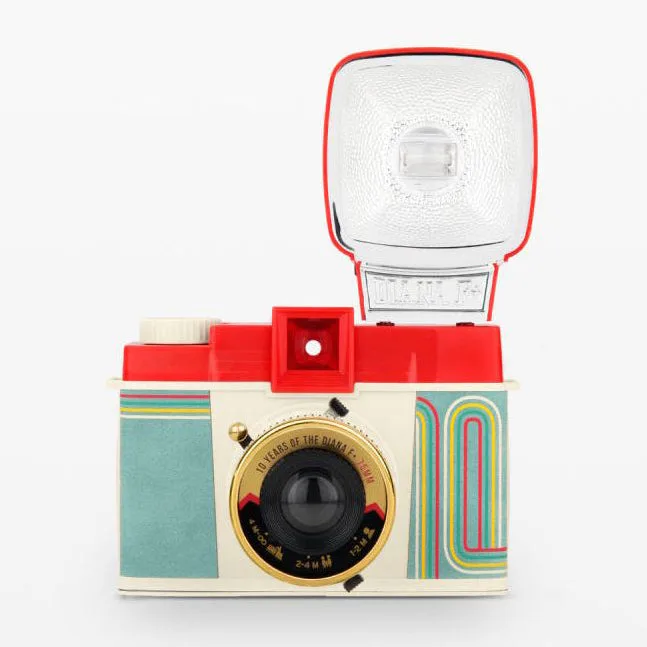
- Diana F+ Medium Format Camera and Flash - 10 Year Anniversary Edition: Celebrate 10 years of the Diana F+ with this special edition medium-format camera, complete with funky matte red and blue case and a rockin’ retro gold lens. The 10 Year Anniversary Edition includes a distinctive gold lens and a protective case, so you can carry it without adding a separate bag.
- Diana F+ Medium Format Camera and Flash - 10 Year Anniversary Edition: Light up your shots with the retro-looking Diana+ Flash. The bundled flash matches the camera's lo-fi look and is ready for indoor or low-light shooting without buying extra gear.
- Diana F+ Medium Format Camera and Flash - 10 Year Anniversary Edition: Splash your shots with color using the colored gel filters. Gels let you tint flash output for creative effects, but they reduce light, so open the aperture one stop when using a gel.
- Diana F+ Medium Format Camera and Flash - 10 Year Anniversary Edition: Experiment with pinhole photos. The pinhole setting turns the Diana F+ into a zero-aperture camera for long exposures, but you'll need a tripod and a cable release.