Quick answer
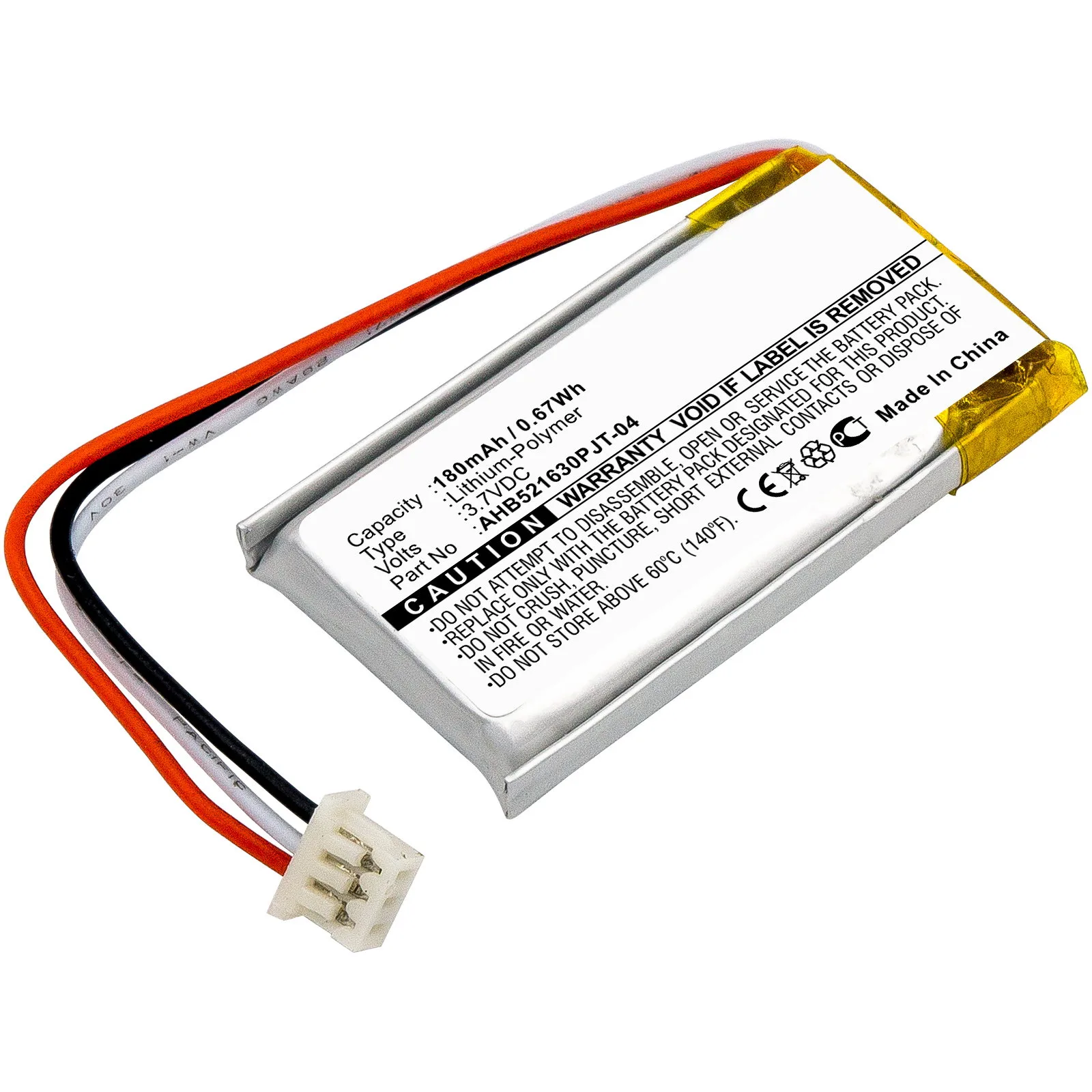
Replace the MX Vertical battery with a pack that matches the original part numbers 810-006368, M-R0074, or AHB521630PJT-04 and the 180mAh rating. Work on a clean, static-safe surface, open the shell from the base, disconnect the old pack before lifting it, and route the new cable exactly as the original was seated. If the mouse still drops out after a full charge, the battery is usually not the cause.
Before you open the mouse
Confirm the fault first. Charge the mouse fully, then watch it in Logitech Options or on the underside LED. A pack that holds charge for only minutes, swells, or refuses to accept charge points to the battery; random cursor jumps or a dead sensor usually do not.
Collect the tools before touching a screw: a small Phillips driver, a plastic pry tool or guitar pick, fine tweezers, and isopropyl alcohol for the old adhesive. A magnetic parts tray stops the base screws from rolling away, and a phone photo of the open shell gives you a reference for cable routing.
Match the part number, not just the shape
The MX Vertical battery is sold under several identifiers, including 810-006368, M-R0074, and AHB521630PJT-04. A replacement listed with those numbers and a 180mAh capacity is the direct fit. A physically similar cell with a different connector or a higher capacity is not a safe substitute, because the charging circuit is calibrated for the original pack.
If a listing does not state the part number, capacity, or connector type, treat that as missing information rather than assuming compatibility. Ask the seller before ordering, or choose a listing that publishes those details.
Opening the shell without cracking it
Remove the glide pads at the base to reach the screws underneath, then take out the visible screws. Keep the pads somewhere flat so they can be re-seated later. The shell is held by clips as well as screws, so slide a plastic pry tool along the seam and work around the perimeter in small increments instead of levering at one point.
When the two halves separate, stop before pulling them apart fully. A ribbon cable or battery lead may still connect the halves, and a sharp tug is the most common way to tear a connector off the board.
Swapping the pack and closing up
Disconnect the battery lead from the board before removing the pack, using tweezers on the connector housing rather than pulling the wires. Lift the old pack with a plastic tool; if it is stuck, soften the adhesive with a little isopropyl alcohol and let it work rather than forcing it. A swollen pack should be removed carefully and not punctured.
Seat the new pack flat, reconnect the lead until it clicks or seats fully, and tuck the cable into the same channel the original used. Reassemble in reverse order, then charge the mouse fully before judging the repair. If the mouse still reports low battery immediately, recheck the connector seating before assuming the new pack is faulty.
Step-by-step replacement
- Confirm the battery is the fault: Charge fully and watch runtime and the underside LED. A pack that lasts minutes, swells, or will not charge is the likely culprit; random cursor jumps or a dead sensor are not. Checkpoint: if the mouse behaves normally when wired, the pack is the prime suspect.
- Match the part number and capacity: Look for 810-006368, M-R0074, or AHB521630PJT-04 and a 180mAh rating. Do not substitute a different connector or a higher-capacity cell. Mistake to avoid: ordering by shape alone and discovering the connector does not fit.
- Remove the base pads and screws: Peel the glide pads back to reach the screws, keep them flat, and put the screws in a tray so none are lost. Checkpoint: all base screws out before any prying begins.
- Release the shell clips gradually: Run a plastic pry tool around the seam in small steps. Stop as soon as the halves begin to separate. Mistake to avoid: levering hard at one point and cracking the shell or snapping a clip.
- Disconnect the old pack before lifting it: Use tweezers on the connector housing, not the wires. If the pack is stuck, soften the adhesive with isopropyl alcohol instead of pulling. Checkpoint: connector free and pack loose before you remove anything else.
- Seat the new pack and route the cable: Press the pack flat, reconnect the lead until fully seated, and tuck the cable into the original channel so it is not pinched by the shell. Mistake to avoid: trapping the lead under a clip, which causes intermittent power.
- Reassemble and charge fully: Refit the shell, screws, and glide pads, then charge the mouse completely before testing runtime. If the low-battery warning returns immediately, reseat the connector before blaming the new pack.
Replacement pack facts
- 810-006368, M-R0074, AHB521630PJT-04 Battery for Logitech MX Vertical 180mAh Battery Replacement 810-006368, M-R0074, AHB521630PJT-04: Replacement Logitech MX Vertical battery listed for part numbers 810-006368, M-R0074, and AHB521630PJT-04 with a 180mAh rating. Matching all three identifiers and the original capacity is what makes this a direct-fit swap rather than a generic cell that may not charge correctly.