Quick answer
Set up your Sonoff Basic in three stages: wire the relay safely, power it up, and pair it with the eWeLink app. This guide walks you through each step and highlights common beginner mistakes.
Before you start: safety and tools
The Sonoff Basic is an ESP8266-based WiFi relay designed for low-voltage DC or mains-powered appliances. Always disconnect mains power before wiring. You will need a small flathead screwdriver, a micro-USB cable (5V power supply), and the eWeLink app installed on your phone.
Wiring the Sonoff Basic correctly
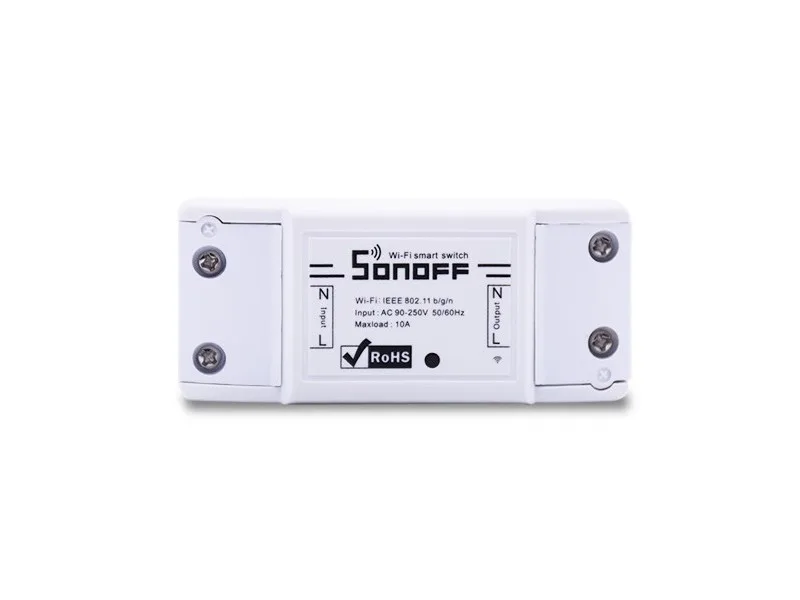
The relay has four screw terminals: Line In (L), Neutral In (N), and two output terminals (O1 and O2). For a typical lamp, connect the live wire to L and the load wire to O1; neutral wires go to N and O2. A common mistake is swapping L and O1, which bypasses the relay and leaves the load always powered.
Sonoff Basic setup steps
- 1. Wire the relay: Connect your load (e.g., a lamp) to the Sonoff Basic terminals as described above. Double-check that all screws are tight and no loose strands touch adjacent terminals. Common mistake: reversing L and O1 leaves the load always on. Verify with a multimeter before powering up.
- 2. Power the module: Plug a micro-USB cable into the Sonoff Basic and a 5V USB power adapter. The red LED should light up. If using mains voltage, close the enclosure before connecting mains power. Use a dedicated 5V adapter rated at least 1A. Underpowered adapters may cause intermittent WiFi drops.
- 3. Pair with eWeLink: Open the eWeLink app, create an account if needed, and tap 'Add Device'. Press and hold the Sonoff Basic's button (next to the USB port) until the LED blinks rapidly. The app will find the device automatically. If pairing fails, move your phone closer to the Sonoff or check that your router is on 2.4 GHz band. The ESP8266 does not support 5 GHz WiFi.
- 4. Test remote control: Once paired, toggle the switch in the app. The relay should click and your connected load should turn on/off. You can now set schedules or link it with other smart devices. If the relay does not respond, check the wiring again and ensure the load is rated within the Sonoff Basic's limits (max 10A resistive).
Product used in this guide
-
Sonoff Basic - WiFi Wireless Smart Switch: The Sonoff Basic is an affordable ESP8266-based WiFi wireless switch that connects to a wide range of appliances and transmits data to a cloud platform through your WiFi router. This means you can control lights, fans, or other devices remotely from the eWeLink mobile app without running new wires.
Sonoff Basic - WiFi Wireless Smart Switch