Quick answer
The Sony Vlogger Accessory Kit bundles the GP-VPT2BT Wireless Shooting Grip and a 64GB SDXC memory card. This guide walks you through unboxing, pairing the grip, inserting the card, and using the grip's controls to improve your vlogging stability.
Why the Kit Works for Vlogging
The kit focuses on two essentials: a stable grip and reliable storage. The GP-VPT2BT grip doubles as a tripod, letting you set the camera down for hands-free shots or use it as a handle for smooth walking footage. The included 64GB SDXC card gives you enough space for hours of 4K video without needing to swap cards mid-session.
One tradeoff: the grip is designed for select Sony cameras that support Bluetooth pairing. If your camera lacks Bluetooth or is not listed as compatible, you won't get the wireless shutter and zoom functions. Check your camera manual before buying.
How to set up and use your Sony Vlogger Accessory Kit
- Unbox and check contents: Open the kit and confirm you have the GP-VPT2BT grip, the 64GB SDXC card, and any included documentation. The grip may come with a small wrist strap. Check that the grip's battery compartment has the included CR2032 battery installed, or insert a fresh one before proceeding.
- Insert the SD card into your camera: Locate the SD card slot on your Sony camera. Slide the 64GB SDXC card in with the label facing the back of the camera until it clicks. Format the card in the camera's menu (Setup > Format) to ensure compatibility. Formatting erases all existing data, so backup any files from the card first.
- Pair the GP-VPT2BT grip with your camera: Turn on your camera and navigate to the Bluetooth settings (usually under Network or Wireless menu). Set the grip to pairing mode by sliding the power switch to the Bluetooth icon. Select the grip from the camera's device list and confirm pairing. A steady Bluetooth indicator on the grip confirms connection. If pairing fails, reset the grip by removing and reinserting the battery, then retry. Keep the camera and grip within 3 feet during pairing.
- Attach the grip to your camera: Screw the grip's 1/4-20 tripod mount into the camera's bottom tripod socket. Tighten gently by hand—do not overtighten. The grip can be used as a handle or, by spreading the legs, as a mini tripod. When using as a tripod on uneven surfaces, extend the legs fully and check stability before releasing the camera.
- Test the wireless shutter and zoom: Press the shutter button on the grip halfway to autofocus, then fully to take a photo or start/stop video recording. Use the zoom lever (if supported by your lens) to adjust focal length remotely. If nothing happens, confirm the camera is set to a compatible shooting mode (e.g., Intelligent Auto or Movie). The zoom function only works with power zoom lenses. If your lens is manual zoom, the lever will have no effect.
- Adjust grip angle for stable footage: Tilt the grip head to angle the camera up or down for different compositions. For walking vlogs, hold the grip at waist level and keep your arm relaxed to reduce shake. For static shots, spread the legs and set the camera on a flat surface. Avoid using the grip as a selfie stick—the legs are not designed to support the camera at arm's length for extended periods.
Product facts
-
Sony Vlogger Accessory Kit: Includes the GP-VPT2BT Wireless Shooting Grip and a 64GB SF-E Series UHS-II SDXC memory card. You get both a stabilizing grip and fast storage in one box, saving time and money compared to buying separately.
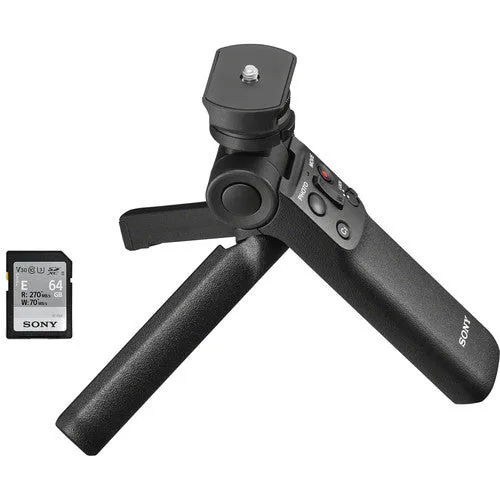
Sony Vlogger Accessory Kit


