Quick answer
The HobbyBlocks case for Arduino Uno is a snap-together brick enclosure that leaves all ports and pins accessible. Assembly takes about 10 minutes and requires no tools.
Why brick cases are different from acrylic enclosures
Unlike a typical acrylic case that needs screws and standoffs, the HobbyBlocks case uses standard plastic building bricks. That means you can modify the layout, add extra layers, or even combine it with other brick structures. The trade-off is that the case stays open across the top, so it won't protect against spills or dust like a sealed box. It's ideal for prototyping, education, or display builds where you need quick access to the board.
Assembly steps
- 1. Sort the bricks: Lay out all bricks included in the kit. Identify the base plate, side walls, and corner pieces. Most kits use a standard 2×4 or 2×6 brick layout. Common mistake: forcing bricks together without aligning studs can crack thin walls. Always press straight down.
- 2. Build the base layer: Snap the base plate onto the bottom of the Arduino Uno board. The case is designed for the Uno R3 form factor, so the board should sit flush with the plate edges. Checkpoint: ensure the USB port and power jack are not blocked by bricks. If they are, rotate the base plate 180°.
- 3. Add side walls: Attach the side wall bricks around the perimeter of the base plate. Leave the top row of pins exposed as intended by the open-top design. Common mistake: stacking walls too high can block the ICSP header or reset button. Keep walls at 2 bricks tall max.
- 4. Secure the board: Press the Arduino board down onto the base plate studs. The board should not wobble. If it feels loose, add a thin non-slip pad between board and plate. Checkpoint: verify all six mounting holes on the Uno align with brick studs. If not, the case may be for a clone board with different hole spacing.
- 5. Test port access: Plug in a USB cable, a power adapter, and a shield (if using). Confirm each connector fits without forcing. The open top should allow easy plug/unplug. Final check: if a shield sits crooked, the side walls may be too tight. Remove one brick from each side to create breathing room.
Product facts
-
HobbyBlocks case for Arduino Uno: The case is made entirely of plastic building bricks and remains open across the top of your Arduino or compatible Uno R3 to allow access to all ports and pins. You can plug in USB, power, and shields without removing the case, making it practical for active development or classroom use.
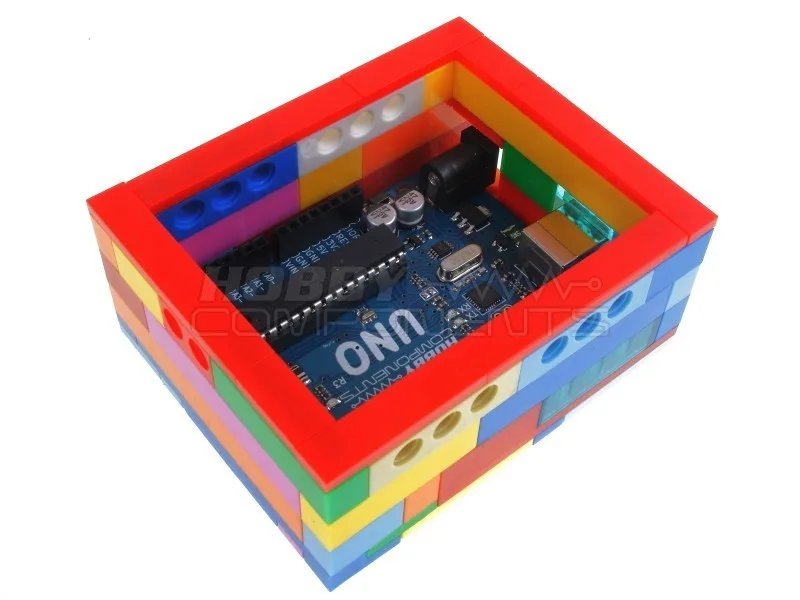
HobbyBlocks case for Arduino Uno


