Quick answer
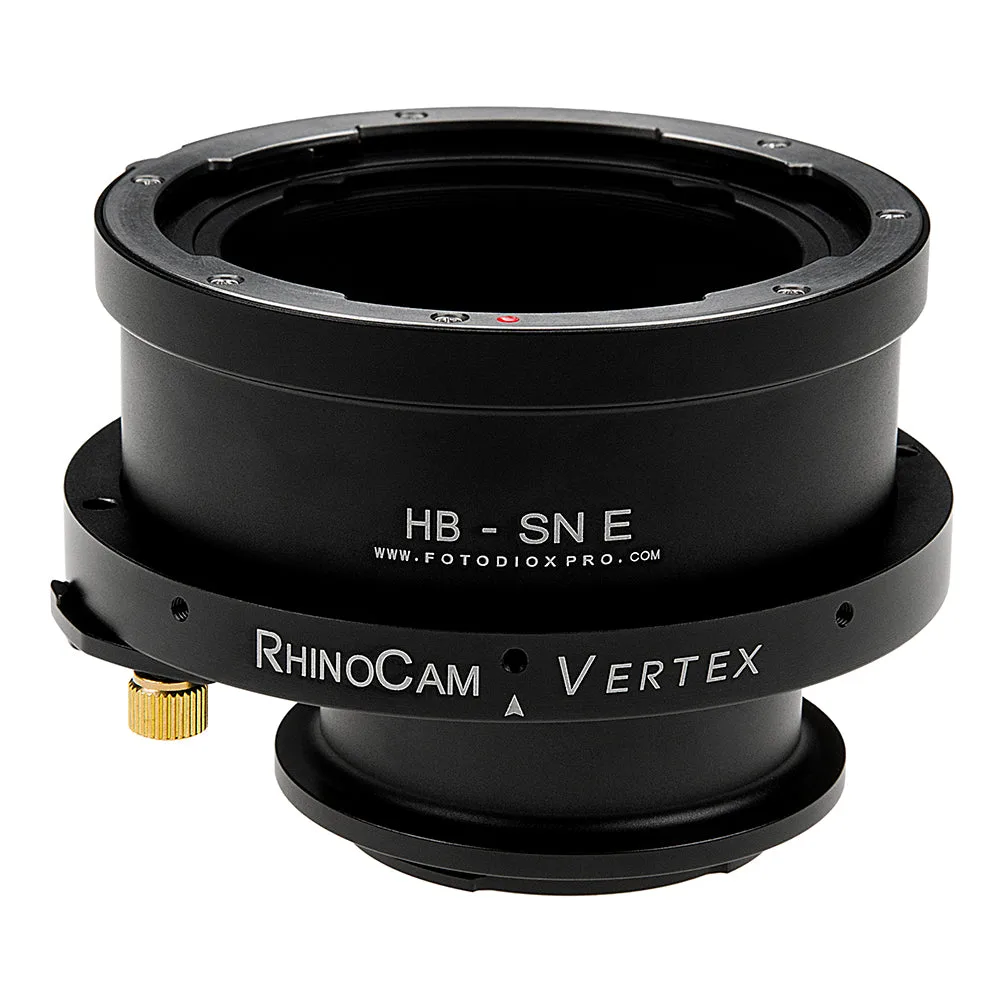
To shoot macro panoramas with a rotating stitching adapter, mount a medium-format lens like a Hasselblad V-mount on a Sony E-mount camera using the RhinoCam Vertex, then rotate the adapter in controlled increments across a linear array. Keep the camera fixed, use manual exposure, and stitch the frames in software for high-resolution results. The key is consistent overlap and no movement between exposures.
Why use a rotating stitching adapter for macro
A rotating stitching adapter such as the RhinoCam Vertex lets you connect a medium format lens to a smaller sensor camera, capturing multiple exposures in a linear array that you later stitch into one high-resolution image. For macro work, this approach multiplies effective resolution without needing a higher-megapixel camera. The linear array also reduces the distortion errors common in spherical stitching, making it ideal for flat subjects like coins, stamps, or circuit boards.
Setting up the adapter and camera
Attach the RhinoCam Vertex to your Sony E-mount camera, then mount a Hasselblad V-mount lens. Ensure the adapter is securely locked and there is no play. Set your camera to manual mode and disable any image stabilization. Use a sturdy tripod and a macro focusing rail if you need fine focus adjustments. Because the adapter shifts the lens across the sensor, you will need to rotate it in steps as indicated by the adapter's markings.
Exposure and overlap strategy
Set exposure manually to keep it consistent across all frames. Use a narrow aperture like f/8 to f/11 for sufficient depth of field, but avoid stopping down too far to prevent diffraction. Determine the overlap by checking the adapter's rotation increments; typically 20-30% overlap is safe. Focus on the center of your subject and do not refocus between shots. If your lens has a focusing helicoid, you can fine-tune focus without moving the camera.
Stitching and post-processing
Import your frames into stitching software like Photoshop, PTGui, or Hugin. Choose a linear or cylindrical projection, not spherical, to match the adapter's linear array. Align the images and blend them. Because the frames are captured in a straight line, the software can stitch them with minimal distortion. Crop the final image to remove any uneven edges. For best results, shoot in RAW and apply consistent edits before stitching.
Step-by-step rotating stitching adapter setup
- Mount the adapter and lens: Attach the RhinoCam Vertex to your Sony E-mount camera, then mount a Hasselblad V-mount lens. Ensure all connections are tight. Checkpoint: Give a gentle tug to confirm no movement.
- Set up your support system: Use a sturdy tripod and consider a macro rail for precise positioning. Lock down all movements. Mistake: Using a flimsy tripod can cause shifts between frames.
- Configure camera settings: Set manual mode, manual focus, and disable stabilization. Choose aperture f/8–f/11 and set ISO to base. Checkpoint: Take a test shot to verify exposure.
- Rotate and capture frames: Rotate the adapter in its defined increments, capturing a frame at each position. Ensure 20-30% overlap between frames. Mistake: Rotating too far can leave gaps; too little creates excessive overlap.
- Stitch and refine: Import frames into stitching software, select linear projection, align, and blend. Crop the final image. Next step: Save as a high-resolution TIFF for printing.
Product facts
- RhinoCam Vertex Rotating Stitching Adapter, Compatible with Hasselblad V-Mount SLR Lens to Sony Alpha E-Mount Mirrorless Cameras: Connects a low cost camera sensor with a medium format lens for astonishing medium format photography at a fraction of the normal price. Multiple exposures are in a linear array, perfect for flat-stitching to reduce distortion errors inherent in spherical stitching. This makes it ideal for macro panoramas where you want high resolution and minimal distortion, especially for flat subjects.