Quick answer
Wire your RGBW LED strip to the mLink controller's screw terminals, connect the module to your Arduino via I2C, and use the provided library to set colors and brightness.
Understanding the mLink RGBW Controller
The mLink RGBW LED controller module is a serial I2C interface that lets a microcontroller like an Arduino control common RGB and RGBW LED strips. It handles 5V, 12V, and 24V strips, making it flexible for different projects. The module uses screw terminals for a secure connection to the strip's power and color channels.
One limitation: the module controls non-addressable (analog) RGBW strips, not individually addressable LEDs like WS2812B. If you need per-LED effects, look for a dedicated addressable LED driver.
Setup steps
- 1. Connect power and LED strip: Attach your LED strip's positive wire to the module's +Ve terminal and the ground to the common ground. Connect the red, green, blue, and white wires to their respective screw terminals. Double-check polarity—reversing power can damage the strip. Use a multimeter to verify voltage before connecting the strip.
- 2. Wire I2C to Arduino: Connect the module's SDA pin to Arduino A4 (Uno) or the dedicated SDA pin on other boards, and SCL to A5 (Uno) or the SCL pin. Pull-up resistors are usually built in, but if communication fails, add 4.7kΩ resistors between SDA/SCL and 5V. Keep I2C wires under 50 cm to avoid signal degradation.
- 3. Install the mLink library: Download the mLink RGBW library from the product page or the official repository. In the Arduino IDE, go to Sketch > Include Library > Add .ZIP Library and select the downloaded file. Restart the IDE. If the library isn't listed, manually copy it into the libraries folder.
- 4. Upload a test sketch: Open the example sketch from File > Examples > mLink_RGBW > BasicTest. Set the I2C address (default 0x20) and upload. The strip should cycle through colors. If nothing happens, check the address—conflicts with other I2C devices can cause issues. Use an I2C scanner sketch to confirm the module's address if the test fails.
- 5. Adjust brightness and color: Use the library's setColor(r, g, b, w) function to set each channel from 0 to 255. For smooth transitions, add small delays between changes. Note that the module does not support hardware PWM frequency adjustment—software PWM may flicker at low brightness. If flickering occurs, increase the delay or use a higher PWM frequency library.
Product details
-
mLink RGBW LED Controller Module: The mLink RGBW LED controller module is a serial I2C module for controlling common RGB and RGBW LED strips with screw terminals for +Ve, -red, -green, -blue, and -white connections. It supports 5V, 12V, and 24V strips, so you can reuse the same controller across different voltage projects without extra level shifters.
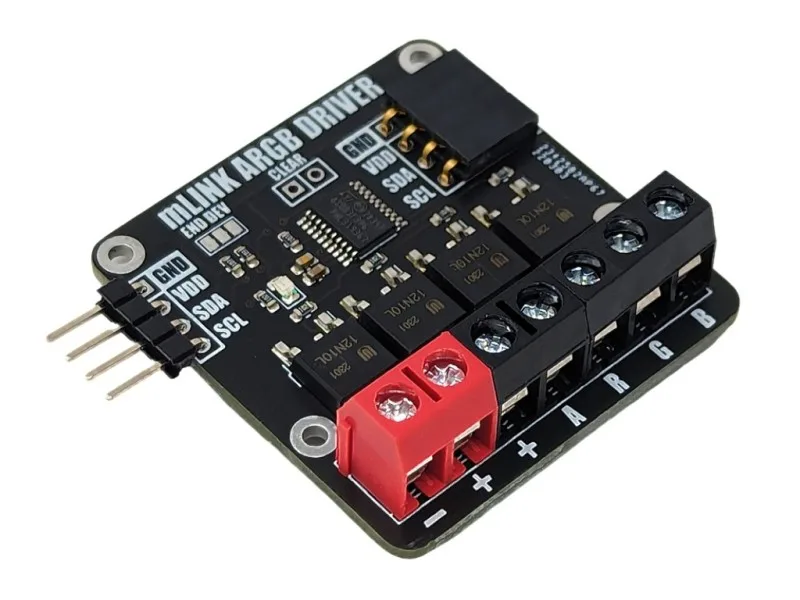
mLink RGBW LED Controller Module
