Quick answer
Mount the SmallRig HawkLock H21 on a NATO rail or rosette, tighten the center lever until the ball heads lock, then route a right-angle USB-C or HDMI cable along the arm with slack loops. Test every joint by hand before adding a monitor or light.
Plan the arm position before you mount anything
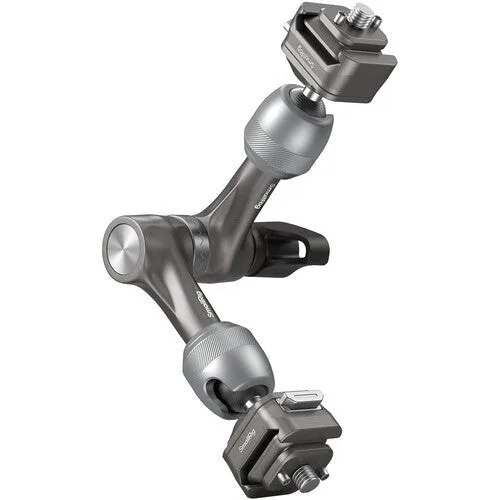
Hold the SmallRig HawkLock H21 against your cage or top handle and imagine where your monitor or light needs to sit. The 7-inch arm gives you reach, but the center rosette joint and two ball heads each add a pivot point, so every extra angle eats stability. Aim for one bend at the center and one at each end, not a zigzag.
Route cables before you lock the arm
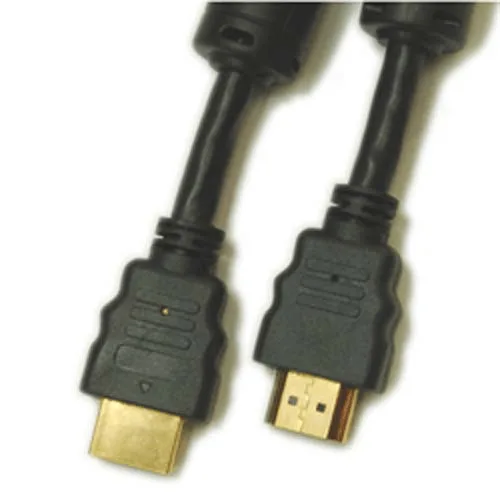
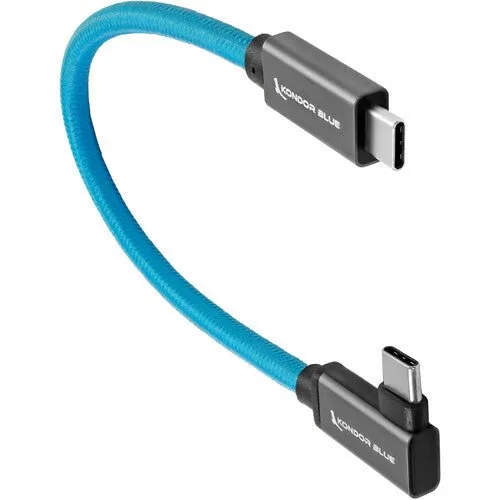
Cables are much harder to add after the arm is tight. Connect your monitor or SSD first, then run the cable along the arm with a small service loop near each joint. A right-angle connector like the Kondor Blue USB-C keeps the plug from sticking straight out and snagging on your hand or a strap. For HDMI runs, the Promaster 10-inch cable is short enough to avoid a messy coil on a compact rig.
Check clearance and torque at every joint
Once the arm is mounted, move it through its full range by hand. If a ball head slips under the weight of your accessory, stop and retighten the center lever. The H21 uses a single large lever to secure both ball heads and the rosette, so one loose point usually means the whole arm needs another quarter turn. Never force a joint past its stop.
Step-by-step rig setup
- Attach the arm to a NATO rail or rosette: Slide one NATO clamp onto your cage or top handle and tighten the thumbscrew until the arm cannot twist. If your rig uses a rosette mount, align the teeth before tightening so the arm does not strip. Checkpoint: the arm should hold its own weight without drooping.
- Mount your accessory and set the angle: Attach your monitor or light to the free 1/4"-20 anti-twist end. Loosen the center lever just enough to move the ball heads, position the accessory, then tighten the lever firmly. Do not over-tighten past hand pressure. Checkpoint: the accessory stays put when you tap it lightly.
- Run and secure your cables: Connect a right-angle USB-C or a short HDMI cable, leaving a small loop near each joint. Use hook-and-loop ties on the arm, not on the cable's connector, to prevent strain. Avoid routing cables across the center lever where they can be pinched. Checkpoint: cables have slack at full extension and do not pull on the ports.
- Test the full range of motion: Move the arm through its intended positions with the accessory attached. If any joint slips, retighten the center lever. If a cable binds, reroute it before shooting. Next step: mark your preferred position with a small piece of tape so you can reset quickly.
Products that support this setup
- SmallRig HawkLock H21 Quick Release Rosette Magic Arm (7"): The SmallRig 7" HawkLock H21 Quick Release Rosette Magic Arm has NATO clamps with 1/4"-20 anti-twist attachments on both ends and a large center locking lever that secures both ball heads and the center rosette joint. The dual NATO clamps let you move the arm between a cage, top handle, or monitor without extra adapters, while the single lever means you can lock the whole arm with one hand.
- Kondor Blue Right-Angle USB-C 3.1 Gen 2 Cable (8.5”, Blue): The Kondor Blue Right-Angle USB-C 3.1 Gen 2 Cable (8.5", Blue) supports Thunderbolt 3 and up to 100 watts of power. The right-angle plug keeps the connector flush against a monitor or SSD, reducing snag risk, and the power rating means you can charge a device while it stays connected.
- Promaster HDMI Cable A Male - A Male 10": The Promaster HDMI Cable A Male - A Male 10" complies with HDMI High Speed 1.4, uses 24k gold-plated connectors, silver-plated conductors, and quad-shielding. The 10-inch length is ideal for short on-rig runs between a camera and monitor, and the shielding helps maintain signal clarity near the arm's metal joints.