Quick answer
Use the Maze & Grid Code Mat to teach early coders through hands-on, unplugged coding activities that build logic, sequencing, and debugging skills.
Why the Maze & Grid Code Mat Works for Early Coders
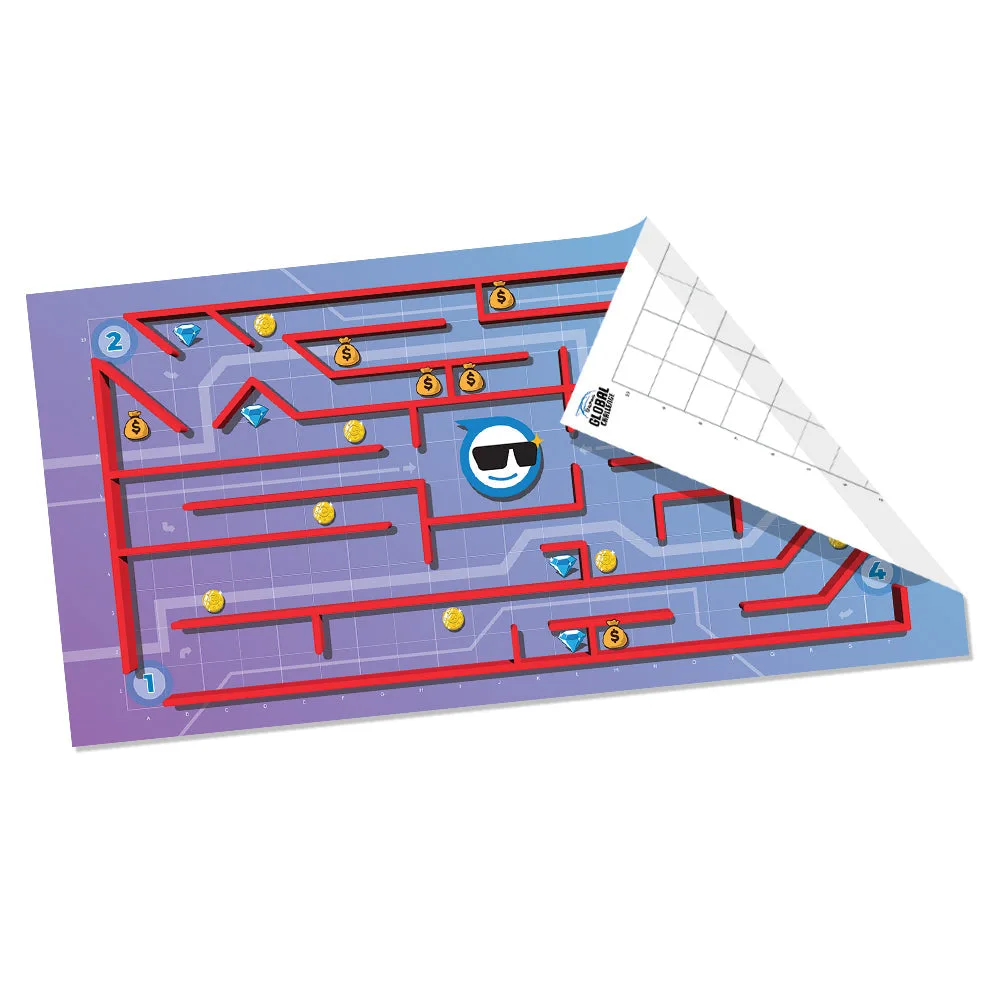
The double-sided mat offers two distinct play surfaces: one side mirrors the official Sphero Global Challenge field for BOLT/BOLT+, while the other provides an open grid for freeform coding. This design lets you start with simple line-following or grid navigation before introducing competition-style challenges.
Because the mat is large and durable, you can use it on the floor or a table. Early coders benefit from the physical movement of robots across a visible grid, making abstract programming concepts like coordinates and loops concrete and easier to grasp.
5 hands-on coding activities for early coders
- 1. Grid navigation basics: Place the mat on a flat surface and set the robot at a starting square. Have the student write a simple sequence of moves (forward, turn left, turn right) to reach a target square. Common mistake: forgetting to reset the robot's heading after each turn. Checkpoint: After each move, ask the student to predict the robot's new position before pressing go.
- 2. Maze solving with loops: Use the maze side of the mat. Ask the student to design a path from start to finish using only three repeated commands. Common mistake: students often create long, linear code instead of recognizing repeating patterns. Checkpoint: Have them circle the repeated section in their code before running it.
- 3. Unplugged coding relay: Print or draw arrow cards (forward, turn left, turn right, go to next square). In small groups, one student reads a card aloud while another moves the robot. Common mistake: rushing and skipping a card, causing the robot to veer off course. Checkpoint: Have the group double-check the card sequence before moving the robot.
- 4. Coordinate treasure hunt: Label grid intersections with coordinates (A1, B2, etc.). Hide a small object under one square and have the student write a program to reach that coordinate. Common mistake: mixing up row and column order. Checkpoint: Have the student trace their intended path with a finger while reading the coordinates aloud.
- 5. Debug the buggy path: Pre-program a flawed route that hits a wall or misses a target. Ask the student to identify and fix the error. Common mistake: students often change the entire code instead of isolating the faulty command. Checkpoint: Encourage them to run the program step-by-step and mark the line where the robot first goes wrong.
Product facts
-
Maze & Grid Code Mat: One side of the mat provides the official competition field size for BOLT/BOLT+ in The Sphero Global Challenge. You can use the same mat for both practice and official competition, so students don't need to adjust to a different layout when transitioning from classroom activities to challenges.
Maze & Grid Code Mat