Quick answer
Connect the Anker 547 USB-C Hub to your MacBook's USB-C port, then attach your peripherals. The hub requires no drivers and works instantly.
Understanding the 7-in-2 Ports
The Anker 547 USB-C Hub provides seven ports in a compact design, but it only has two physical connectors: one USB-C for your MacBook and one for power delivery. This means you get 7 port functions (like USB-A, HDMI, SD card, etc.) through the hub's body, not seven separate cables.
A common mistake is plugging the hub into a USB-A port or a non-USB-C MacBook. The hub is designed for MacBooks with USB-C connectivity only. Check your MacBook model before purchase.
When to Use the Power Delivery Port
The Anker 547 includes a dedicated USB-C port for power delivery. If you need to charge your MacBook while using the hub, connect your MacBook's original charger to this port. Without it, the hub will still work for data but won't charge your laptop.
Note that the hub does not include a power adapter—you supply your own. This keeps the hub compact but means you need to keep your charger handy for pass-through charging.
Step-by-step setup guide
- Connect the hub to your MacBook: Plug the hub's built-in USB-C cable directly into your MacBook's USB-C port. Do not use a USB-A adapter or a different port type. If the hub doesn't fit, your MacBook may not have a USB-C port. Check your model's specifications.
- Attach your peripherals: Connect your monitor via HDMI, mouse/keyboard via USB-A, or SD card via the card slot. The hub supports simultaneous connections. For best performance, connect high-bandwidth devices like monitors first, then add lower-bandwidth devices.
- Enable pass-through charging (optional): Connect your MacBook charger to the hub's USB-C power delivery port. Your MacBook will charge while you use the hub. Without this step, the hub works for data only. Your MacBook battery will drain during use.
- Verify connections: Check that your monitor displays correctly and all peripherals are recognized. Open System Preferences > Displays to adjust monitor settings if needed. If a device isn't detected, unplug and reconnect it. Avoid using extension cables or adapters between the hub and your MacBook.
Product facts
-
Anker 547 USB-C Hub (7-in-2, for MacBook): 7-in-2 functionality: Provides multiple ports to connect your peripherals, displays, and more. You can connect a monitor, external drive, SD card, and mouse simultaneously without swapping cables.
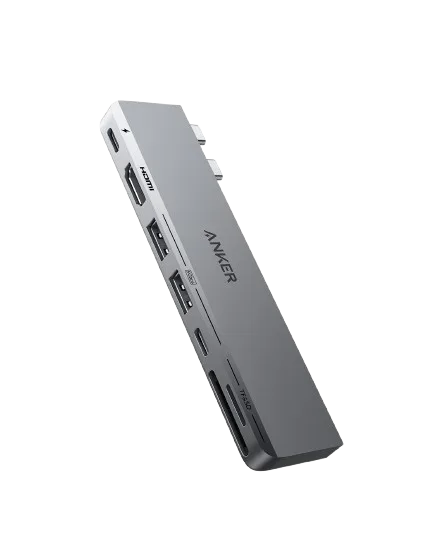
Anker <b>547</b> USB-C Hub (7-in-2, for MacBook)